As Amazon Associates, we earn from qualifying purchases. This means we may receive a small commission at no extra cost to you if you click through and make a purchase.
uni has carved out a solid reputation in the peripheral space by focusing on clean, minimalist connectivity hardware built around practical durability. Rather than producing oversized docking stations requiring proprietary utility software and bulky external power bricks, the company specializes in compact network adapters and streamlined hubs. Their networking hardware frequently features machined aluminum housings that double as heatsinks, reinforced braided nylon cabling that resists fraying, and reliable controller chips that deliver stable gigabit speeds without unnecessary clutter.
While all five adapters in this lineup provide a dependable 10/100/1000 Mbps wired connection, they differ primarily by their host connector type, the presence of supplemental 5Gbps USB ports, and whether they support 100W power delivery passthrough.
1 uni USB to Ethernet Adapter,Driver Free for Classic Desktops
 8.6/10
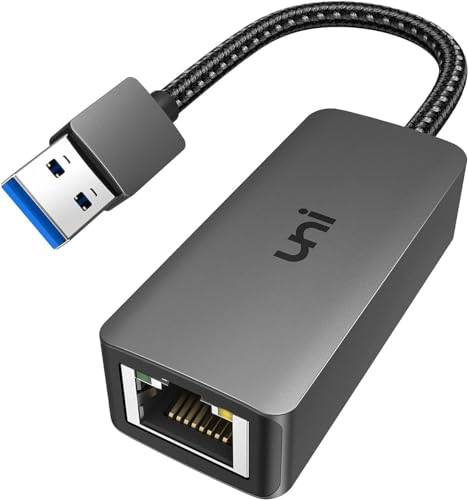
The uni USB to Ethernet Adapter,Driver Free, designated under model number uni AE01, is designed for computers that feature standard USB-A ports. Built as a direct bridge between a local network router and a PC, this uni usb 3.0 to gigabit ethernet adapter houses an intelligent Realtek RTL8153 controller chip that stabilizes data transmission during large file transfers, online classes, and video conferences. Its compact exterior combines a snug USB-A connector with an integrated LED indicator to verify active network traffic, while a bend-resistant braided nylon cord ensures the adapter easily survives daily transport inside a laptop sleeve.
On the networking side, the adapter delivers full 10/100/1000 Mbps bandwidth when paired with a Cat6 or higher Ethernet cable on an active USB 3.0 bus. It maintains backward compatibility with legacy USB 2.0 and USB 1.1 ports, although speeds on those older interfaces remain hardware-limited to 10/100 Mbps. Network administrators will appreciate built-in support for advanced management protocols, including Wake-on-Lan (WoL), Crossover Detection, and timing recovery, which streamline remote maintenance on enterprise machines.
Operating system support is broad across legacy and modern platforms, functioning without manual driver setup on ChromeOS, Mac OS X 10.5 or later, Linux, and Windows versions ranging from XP up to Windows 10. However, the listing explicitly notes that Windows 11 systems require a manual driver installation, and the hardware is not compatible with the Nintendo Switch. For buyers seeking a dedicated uni ethernet adapter to restore or stabilize a wired connection on a USB-A desktop or laptop, the AE01 provides a straightforward solution backed by an 18-month warranty.
Listing details (6 fields)
| Color | Grey |
|---|---|
| Size | USB 3.0 |
| Dimensions | 5.92 x 2.36 x 0.67 inches |
| Weight | 0.05732018812 Pounds |
| Product Group | Home Entertainment |
| Binding | Electronics |
Copied from the Amazon product page, not measured here.
2 uni USB to Ethernet Adapter for USB-A Expansion
 9.2/10
Older laptops and desktop towers frequently suffer from both an absence of wired internet and a shortage of open peripheral ports. The uni USB to Ethernet Adapter addresses both issues at once by combining a gigabit RJ45 port with three USB 3.0 Type-A data ports. Enclosed in a sleek grey aluminum housing measuring 5.1 inches long by 2.4 inches wide and 0.7 inches high, this uni usb ethernet hub expands a single host connection into a multi-device desktop dock while using its metal exterior to dissipate internal operating heat.
The three auxiliary USB 3.0 ports deliver data transfer speeds up to 5Gbps, which is roughly ten times faster than USB 2.0. This allows users to connect desktop essentials like flash drives, external keyboards, mice, webcams, and printers without monopolizing the machine’s native ports. The gigabit network port provides full 10/100/1000 Mbps throughput when fed with a Cat6 cable, offering a steady wired connection that eliminates the packet loss and latency spikes of congested office Wi-Fi. Those comparing multi-port adapters across the broader networking landscape can also read our tp link ethernet adapter overview to see how alternative hubs handle peripheral management.
The manufacturer notes that the USB-A data ports on this hub are engineered specifically for peripheral data syncing rather than charging external electronics. Additionally, because USB 3.0 ports can occasionally create electromagnetic interference with wireless mice and keyboards running on the 2.4GHz band, uni recommends placing wireless receiver dongles away from the hub using an extension cable if connection stutter occurs. The hub works across ChromeOS, Mac OS X 10.5 or later, Linux, and Windows versions from XP to 10, though Windows 11 requires a separate driver download.
Listing details (4 fields)
| Color | Grey |
|---|---|
| Dimensions | 5.118110231 x 2.362204722 x 0.6692913379 inches |
| Product Group | Electronics |
| Binding | Personal Computers |
Copied from the Amazon product page, not measured here.
3 uni USB C to Ethernet Adapter for Modern Laptops
 8.6/10
uni USB C to Ethernet Adapter
Best for: Single-port USB-C laptops needing power
Pros
- 100W Power Delivery passthrough charging
- Simultaneous network and charging operation
- Broad driver-free operating system support
Cons
- Not recommended for charging smartphones
- Provides no extra USB data ports
Best for: Minimalist USB-C laptop and tablet users
Pros
- Compact non-slip aluminum design
- Thunderbolt 3 and 4 compatible
- Supports modern smartphones and tablets
Cons
- Lacks additional peripheral data ports
- No passthrough charging capability
As modern ultrabooks and mobile devices shed mechanical ports to achieve thinner profiles, the integrated Ethernet jack has largely disappeared. The uni USB C to Ethernet Adapter, model uni UNICE01, is engineered to restore wired network access directly through modern Type-C and Thunderbolt 3 or Thunderbolt 4 ports. Constructed with a compact aluminum casing featuring a non-slip textured finish, this uni usb c to ethernet adapter offers an exceptionally low profile that fits neatly alongside other cables on crowded laptop desks.
The UNICE01 provides stable gigabit throughput up to 1Gbps with backward support for 100Mbps and 10Mbps networks. Achieving maximum gigabit transmission requires a Cat6 or higher network patch cable, allowing users to handle continuous video streaming, heavy cloud backups, and latency-sensitive gaming without drops. Its braided nylon cable prevents internal wire fatigue, while the precision-machined Type-C connector ensures a firm, stable fit that resists accidental disconnection from desk movements.
Compatibility on this model extends well beyond traditional computers. Alongside MacBook Pro, MacBook Air, Dell XPS, and Surface Book machines, the listing confirms support for mobile devices including iPad Pro, Google Pixelbook, and smartphones like the iPhone 15 and iPhone 16 lineups. Operating driver-free across modern operating systems, it represents an outstanding pick for travelers and mobile workers who want a simple, pocket-sized dongle. When deciding which uni usb to ethernet adapter to buy for a modern ultrabook that only needs a network jack, the UNICE01 offers a durable, focused design with an 18-month warranty.
Listing details (5 fields)
| Color | Grey |
|---|---|
| Dimensions | 5.92 x 2.36 x 0.67 inches |
| Weight | 0.080027801106 pounds |
| Product Group | Electronics |
| Binding | Electronics |
Copied from the Amazon product page, not measured here.
4 uni USB-C to Ethernet Adapter for Multi-Device Workstations
 8.6/10
uni USB-C to Ethernet Adapter
Best for: USB-C laptops requiring peripheral expansion
Pros
- Combines Gigabit LAN with 3 USB ports
- Aluminum housing for heat dissipation
- Compatible with Thunderbolt 3 and 4
Cons
- No passthrough power delivery port
- Requires manual driver on Windows 11
For users working on thin USB-C laptops that lack both Ethernet and legacy USB ports, plugging in a single-purpose network dongle can quickly exhaust their only expansion port. The 4-in-1 uni USB-C to Ethernet Adapter solves this limitation by integrating a 1000 Mbps RJ45 gigabit port and three 5Gbps USB 3.0 Type-A data ports onto a single Type-C host cable. Encased in a grey aluminum and nylon body measuring 5 inches long by 2.3 inches wide by 0.66 inches thick, it functions as a compact docking hub for desktop workstations.
The three USB-A ports operate at transfer rates up to 5Gbps—yielding a theoretical maximum throughput of 625MB/s—allowing quick file transfers to portable thumb drives or external storage while maintaining live connections to everyday input accessories like mice and keyboards. Simultaneously, the gigabit RJ45 port provides uninterrupted 10/100/1000 Mbps networking, provided the host machine connects through a Cat6 or higher Ethernet line. Dual LED status lights provide instant visual diagnostics for active power and network communication. Users researching high-throughput options across different brands can also review our guide on the ugreen 2.5gb ethernet adapter to evaluate multi-gigabit options.
The adapter features native plug-and-play operation across Mac OS, Chrome OS, Linux, and Windows, though Windows 11 systems require a manual driver installation as detailed in the user guide. It is compatible with a wide range of host hardware, including Apple Silicon MacBooks (M1 and M2), iPad Pro, Surface Go, Dell XPS 13 and 15, and Samsung Galaxy Tab S8 tablets. Because this hub draws bus power directly from the host machine and does not offer power delivery passthrough, your laptop must charge through a secondary port while the hub is connected.
Listing details (4 fields)
| Color | Grey |
|---|---|
| Dimensions | 10.236220462 x 0 x 0 inches |
| Product Group | Personal Computer |
| Binding | Personal Computers |
Copied from the Amazon product page, not measured here.
5 uni USB C to Ethernet Adapter for Single-Port Devices
 8.4/10
Ultra-portable laptops and tablets frequently feature only one or two Type-C connections, forcing users into a frustrating trade-off: either plug in a wired network adapter or connect the battery charger. The uni USB C to Ethernet Adapter (model UA95-23) eliminates this compromise by integrating a 100W Power Delivery input port right beside its RJ45 network jack. This uni usb c to ethernet adapter 100w pd allows high-speed charging current to pass directly into your computer while simultaneously maintaining a wired gigabit internet connection.
Internally, the adapter supports full 10/100/1000 Mbps transmission speeds, making it an ideal tool for users handling bandwidth-heavy office tasks, video calls, or system maintenance on machines without native LAN ports. The outer shell uses an aluminum enclosure that helps disperse heat generated by simultaneous network traffic and high-wattage charging, while the flexible braided nylon cable protects internal connections against sharp desk bends. It operates driver-free across Windows 11, Windows 10, Windows 8, macOS, iPadOS, Chrome OS, and Android systems.
Hardware compatibility covers major Type-C machines, including MacBook Pro, MacBook Air, iPad Pro and Air, Dell XPS 13 and 15, HP Envy x360, and Galaxy Book laptops. Note that while the 100W PD port is built to deliver charging current to laptops and tablets, the manufacturer specifically advises against using it to charge mobile phones. Furthermore, because this adapter does not include auxiliary USB data ports, it focuses entirely on simultaneous power and networking, making it the ideal travel tool for single-port machine owners who cannot sacrifice battery charging for wired speed.
Listing details (3 fields)
| Color | Gray |
|---|---|
| Product Group | Personal Computer |
| Binding | Electronics |
Copied from the Amazon product page, not measured here.
How to Choose the Right uni USB to Ethernet Adapter
Selecting the correct model from this lineup comes down to three main considerations: your machine’s available host port, your need for extra USB accessory ports, and whether your device requires passthrough power delivery. Conducting a quick uni usb to ethernet adapter comparison across these hardware factors ensures you get the exact features your daily workflow demands without buying unnecessary adapters.
First, examine the host port on your computer. If you are outfitting an older desktop PC, a legacy workstation, or a standard office laptop that only has rectangular USB-A ports, you will need either the single-port uni AE01 adapter or the 3-port USB-A hub. Conversely, modern MacBooks, ultrabooks, Chromebooks, and tablets equipped with oval Type-C or Thunderbolt 3 and 4 ports require one of the three USB-C variants: the compact UNICE01, the 4-in-1 multi-port hub, or the 100W PD charging model.
Next, determine whether you need peripheral expansion. If your laptop already has plenty of open ports and you simply need a reliable wired internet connection, dedicated single-purpose dongles like the AE01 or UNICE01 keep your desk clutter-free. However, if plugging in a network dongle leaves you without open ports for a mouse, keyboard, or flash drive, choosing one of the 3-port USB hub models solves your peripheral crunch through a single cable. Shoppers wanting to evaluate broader multi-port alternatives can also reference our anker usb c hub with ethernet breakdown to see how different docking designs compare.
Finally, factor in your battery charging setup and operating system requirements. If your laptop only has a single USB-C port that doubles as its charging input, the 100W PD adapter (model UA95-23) is essential to prevent battery drain while connected to the internet. Across all models, remember that reaching the full 1Gbps gigabit speed requires a Cat6 or higher network cable, and Windows 11 users will need to install a driver manually for models AE01, the USB-A hub, and the 4-in-1 USB-C hub.
FAQ
Do uni USB to Ethernet adapters require manual driver installation?
For most modern operating systems—including macOS, ChromeOS, Linux, and Windows 10—uni network adapters operate with plug-and-play simplicity without requiring extra software. However, the listing documentation specifically states that Windows 11 requires a manual driver installation for the AE01, the USB-A hub, and the 4-in-1 USB-C hub before the network interface will function.
Can I use a uni Ethernet adapter with a Nintendo Switch?
No, the product listings explicitly specify that models like the AE01 are not compatible with the Nintendo Switch. Gaming consoles often require specific embedded network chipset firmware, and these uni adapters are designed primarily for personal computers, laptops, and mobile smart devices.
What kind of Ethernet cable is required to reach full Gigabit speeds?
To achieve the full 1000 Mbps bandwidth supported by uni gigabit adapters, you must use a Cat6 or higher Ethernet patch cable connected to a gigabit-capable router or network switch. Using older Cat5 or Cat5e cables may limit your local network speed to 100 Mbps or result in degraded network performance.
Why does my 2.4GHz wireless mouse lag when connected to a uni USB hub?
USB 3.0 ports emit a small amount of broadband radio frequency noise that can interfere with wireless peripherals operating on the 2.4GHz spectrum, such as wireless mouse and keyboard USB dongles. uni recommends using an extension cable to position 2.4GHz wireless receivers away from the hub body or placing them in a separate port away from the computer’s rear exhaust.
Can the uni USB C adapter charge my laptop while connected to the internet?
Only the uni USB C to Ethernet Adapter with 100W PD (model UA95-23) supports simultaneous device charging and network connectivity. The standard UNICE01 adapter and the 4-in-1 USB-C hub are bus-powered devices that do not feature power delivery input ports, meaning your laptop must rely on battery power or charge through a secondary port.