As Amazon Associates, we earn from qualifying purchases. This means we may receive a small commission at no extra cost to you if you click through and make a purchase.
UGREEN has built a strong reputation in desktop connectivity by offering durable, well-engineered hubs and docking hardware that balance high-bandwidth data performance with clean physical designs. While the brand initially gained widespread recognition for portable USB-C dongles and charging accessories, its modern catalog includes professional desktop docks that support advanced monitor configurations, multi-gigabit networking, and massive power delivery budgets.
When conducting a ugreen docking station comparison across this lineup, the primary differences lie in baseline protocol support, port density, and internal expandability, dividing these units between cutting-edge Thunderbolt 5 workstations, dependable Thunderbolt 4 hubs, and practical USB-C multi-monitor docks designed for daily office tasks.
1 UGREEN Maxidok Thunderbolt 5 Docking Station for High-Bandwidth Workstations
 4.4buyers
UGREEN Maxidok Thunderbolt 5 Docking Station
Best for: Workstations built exclusively around modern Type-C displays
Pros
- Four Thunderbolt 5 ports
- Compact 180W GaN adapter
- Rapid 2.5GbE Ethernet port
Cons
- No HDMI or DisplayPort outputs
- Requires display adapter cables

Best for: Users wanting silent multi-display Thunderbolt 5 speed
Pros
- Fanless silent aluminum shell
- 120Gbps transfer bandwidth
- Native DisplayPort 2.1 port
Cons
- 100W maximum host charging
- Lacks internal SSD storage
Best for: Creative pros needing high-speed internal NVMe storage
Pros
- Internal 8TB M.2 slot
- 120Gbps Thunderbolt 5 speed
- Fast 2.5GbE network jack
Cons
- Audible cooling fan noise
- DisplayPort lacks DP++ support
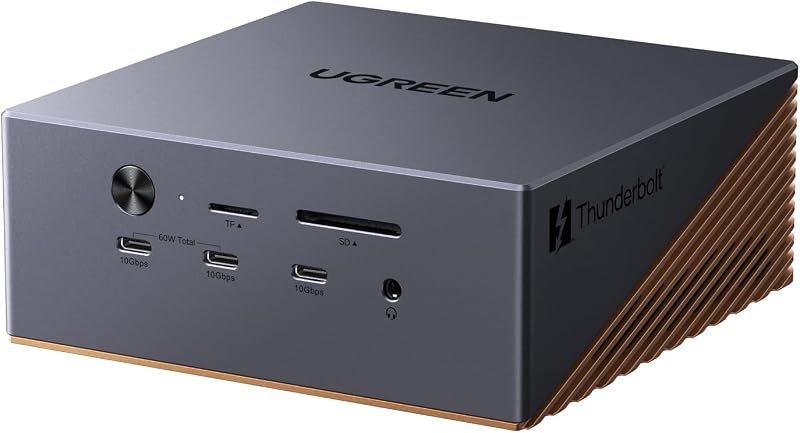
The UGREEN Maxidok Thunderbolt 5 Docking Station represents the pinnacle of UGREEN desktop expansion hardware. Powered by Intel-certified Thunderbolt 5 silicon, this bronze aluminum unit delivers up to 120Gbps of video and data throughput, making it suitable for creative professionals who manage substantial external media pipelines. Under the top cover, it integrates an internal NVMe PCIe Gen4x4 M.2 storage slot capable of housing 2230 through 2280 size drives up to 8TB. To maintain stability across continuous heavy read and write operations, the chassis incorporates an active cooling system featuring a 60mm ultra-thin fan alongside high-efficiency thermal routing.
For desk peripherals, this 17-in-1 powerhouse carries three 10Gbps USB-A ports, three 10Gbps USB-C ports, an SD/TF 4.0 card reader, three individual 3.5mm audio jacks, a 2.5GbE Ethernet port, a DisplayPort 1.4 connection, and two downstream Thunderbolt 5 ports. Total system power reaches 240W, supplying up to 140W to the host laptop while two dedicated USB-C ports share an additional 60W of power output for external devices. On Windows machines, users can operate triple independent displays reaching dual or single 8K at 60Hz across the DisplayPort and dual Thunderbolt 5 outputs, whereas macOS 15 systems support dual displays. Note that its DisplayPort does not support DP++, requiring an active adapter if adapting to an HDMI monitor.
Shoppers trying to decide which ugreen docking station to buy for demanding tasks like uncompressed 8K video editing or multi-stream 3D modeling will find this model unmatched. It consolidates massive external SSD capacity directly into the base unit, bypassing the need for loose external drive enclosures. However, users seeking silent operation or a compact footprint should note that the integrated cooling fan does generate a baseline operational hum under load, directing quieter office setups toward passive alternatives.
Listing details (3 fields)
| Color | Bronze |
|---|---|
| Dimensions | 5.2362204671 x 5.2362204671 x 2.0866141711 inches |
| Product Group | Electronics |
Copied from the Amazon product page, not measured here.
2 UGREEN Maxidok Thunderbolt 5 Docking Station for Silent Productivity
 4.4buyers
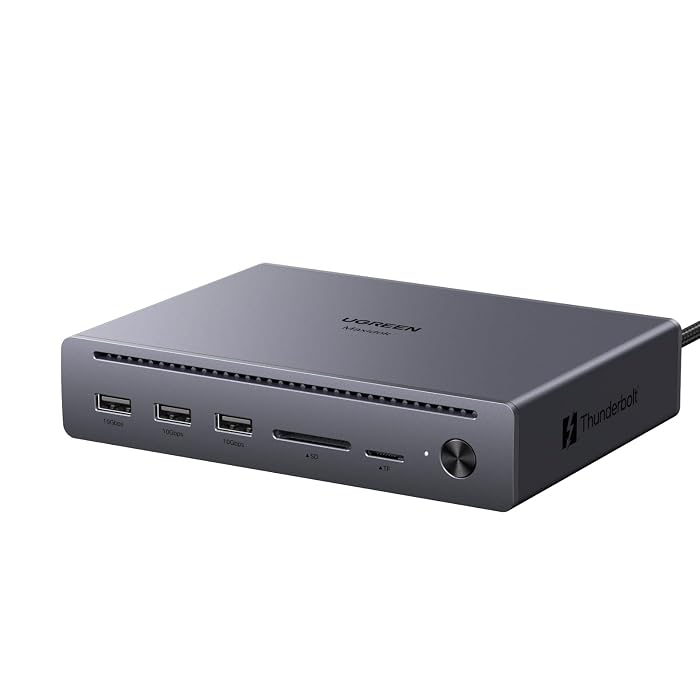
For users who want next-generation data bandwidth without active fan noise, the UGREEN Maxidok Thunderbolt 5 Docking Station provides a streamlined 10-in-1 desktop layout. Built with a solid grey aluminum alloy unibody that works as a passive heatsink, this model relies entirely on internal thermal management to shed heat quietly. Like its larger sibling, it offers Intel-certified Thunderbolt 5 performance with up to 120Gbps uni-directional bandwidth and 80Gbps bi-directional transfer speed, facilitating rapid file backups capable of pushing 6GB files in roughly one second while maintaining backward compatibility with Thunderbolt 4, Thunderbolt 3, and standard USB4 ports.
This ugreen 10-in-1 docking station provides three 10Gbps USB-A ports, an SD and microSD 3.0 dual card reader rated up to 170MB/s, a Gigabit Ethernet jack, a DisplayPort 2.1 connector, and two downstream Thunderbolt 5 ports. The dock operates from a 140W power supply, delivering up to 100W Power Delivery back to power-intensive laptops such as a 16-inch MacBook Pro. Display support reaches single or dual 8K at 60Hz or up to triple 4K at 144Hz when routing across the native DisplayPort 2.1 interface and the secondary Thunderbolt outputs. As with other enterprise docks in this class, the DisplayPort does not support passive DP++ conversion, so active adapters are necessary for HDMI displays.
This unit is specifically tailored for coders, graphic designers, and audio engineers who require extreme visual clarity across multi-monitor setups without introducing desk clutter or fan acoustics. It leaves behind the internal storage slot found on the larger model, making it a sleeker, strictly peripheral-oriented solution for professionals whose laptops already feature sufficient internal drive space.
Listing details (18 fields)
| Hardware Interface | 3.5mm Audio, Ethernet, MicroSD, PCIE x 16, Secure Digital Card, Thunderbolt, USB 3.2 Gen 2 |
|---|---|
| Compatible Devices | MacBook (M4 Standard/Pro/Max, M1/M2/M3 Pro/Max), Mac mini (M4 Pro), and Thunderbolt 5/4 Windows laptops (macOS 15+ required for Mac) See more |
| Total Usb Ports | 3 |
| Number of Ports | 10 |
| Wattage | 140 watts |
| Item Weight | 1.6 kg |
| Color | Grey |
| Brand | UGREEN |
| Number of Items | 1 |
| Item Highlight | 10-in-1, 120Gbps Max Transfer, DP 2.1 Port, Dual/Single 8K@60Hz, 140W Total Power, Gigabit Ethernet, SD/TF 170MB/s See more |
| Manufacturer | Ugreen Group Limited |
| Model Number | U712 |
| Mfr Part Number | 75795F |
| Warranty Description | 2 year |
| Best Sellers Rank | #2,060 in Computers & Accessories (See Top 100 in Computers & Accessories) #150 in Laptop Docking Stations |
| ASIN | B0FRLVWT2D |
| Customer Reviews | 4.4 4.4 out of 5 stars (242) 4.4 out of 5 stars |
| Total USB Ports | 3 |
Copied from the Amazon product page, not measured here.
3 UGREEN Maxidok Thunderbolt 5 Docking Station for All-Thunderbolt Setups
 4.9buyers
Top buyer rating 4.9 average on Amazon, 4.7+ threshold
Ugreen
4.9/5 average from Amazon buyers Overwhelmingly positive
The UGREEN Maxidok Thunderbolt 5 Docking Station takes a modern, port-forward approach by centering its video architecture exclusively around Thunderbolt. The hardware drops legacy display outputs entirely, replacing them with four full Thunderbolt 5 ports that output display signals and move data at speeds up to 120Gbps. This architecture allows simultaneous drive of triple 4K at 144Hz monitors, dual 6K at 60Hz displays, or a single 8K monitor via native Thunderbolt Type-C connections. Because there are no built-in HDMI or DisplayPort jacks, shoppers must use native USB-C or Thunderbolt displays, or rely on dedicated USB-C conversion cables.
UGREEN equips this 13-in-1 station with a dynamic 140W charging system, supported by an included 180W gallium nitride (GaN) power brick that is roughly 33 percent smaller than conventional power bricks and ships with swappable US, EU, and UK plugs. High-speed peripheral needs are served by a 2.5GbE Ethernet port, an SD/TF 4.0 card slot reaching 312MB/s, a 3.5mm headphone jack, one 10Gbps USB-C port, two 10Gbps USB-A ports, and two standard 5Gbps USB-A 3.0 ports. Thermal dissipation relies on an internal dual-layer aluminum chassis paired with conductive silicone pads, while dual-sided rubber bumpers allow the unit to rest flat or stand vertically to save precious desktop territory.
Users who have upgraded to modern studio displays or multi-stream Type-C monitors will appreciate the pure throughput of this ugreen maxidok thunderbolt 5 configuration. It trades traditional video connections for universal high-speed bus connectivity. If your workstation still relies heavily on legacy HDMI cables, this specific model requires additional adapters compared to traditional mixed-port alternatives.
4 UGREEN 8-in-1 Thunderbolt 4 Docking Station for Streamlined Dual-Screen Desks
 4.2buyers
UGREEN 8-in-1 Thunderbolt 4 Docking Station
Best for: Standard dual-screen Thunderbolt 4 laptop users
Pros
- Reliable 40Gbps data speed
- Includes 140W GaN power brick
- Three downstream Thunderbolt ports
Cons
- 85W laptop charging cap
- Base M-series Macs limited
For workstations operating on established standard protocols, the UGREEN 8-in-1 Thunderbolt 4 Docking Station delivers stable 40Gbps host bandwidth in an understated dark gray metal housing. It features one upstream Thunderbolt 4 host port alongside three downstream Thunderbolt 4 ports, each carrying full 40Gbps communication speeds and 15W of downstream device power. This arrangement makes it simple to daisy-chain high-speed external hard drives, audio interfaces, or native Type-C monitors while keeping desk cabling orderly and minimal.
The unit is powered by an included 140W GaN desktop charger that delivers up to 85W of direct charging power to connected laptops. Peripheral connections include three 10Gbps USB-A 3.2 ports for mice, flash storage, and keyboard receivers, complemented by an RJ45 Gigabit Ethernet port for lag-free wired local network access. On Windows laptops, the dock outputs to dual 4K monitors at 60Hz or a single 8K display at 30Hz. For Apple computers, MacBooks running Pro or Max series silicon can drive dual 4K displays at 60Hz, while standard base M-series processors remain limited to a single external display due to native Apple processor display pipeline constraints.
This ugreen thunderbolt 4 docking station is the sensible middle ground for users who want certified high-speed Thunderbolt functionality without paying the price premium attached to the latest 120Gbps silicon. It is an excellent match for MacBook Pro and Dell XPS business users who routinely connect two 4K displays and need reliable 10Gbps peripheral transfers. Those looking to compare standard hub architectures across platforms can explore our anker laptop docking station overview to see how differing port allocations manage peripheral limits.
Listing details (4 fields)
| Color | Dark Gray |
|---|---|
| Dimensions | 9.5 x 9.5 x 2.5 Inches |
| Weight | 3.086471668 pounds |
| Product Group | Electronics |
Copied from the Amazon product page, not measured here.
5 UGREEN USB C Docking Station Dual for Everyday Multi-Screen Office Work
 4.2buyers
Best for: Windows setups requiring three independent external monitors
Pros
- Triple video monitor ports
- Dual 10Gbps USB-C data ports
- 24-bit 192KHz audio jack
Cons
- Mirrors external screens on Mac
- Needs external host power brick
Best for: Windows users running dual HDMI desk monitors
Pros
- Dual full HDMI outputs
- Lightweight 100g enclosure
- Dual 4K at 60Hz support
Cons
- Mirrors displays on macOS
- USB data capped at 5Gbps
The UGREEN USB C Docking Station Dual provides an accessible, driver-free solution for users whose work revolves around productivity suites, web applications, and dual-screen spreadsheets. Weighing just 100 grams, this compact grey aluminum hub connects via a standard USB-C umbilical cable and draws operating power via pass-through charging. It accepts up to 100W of USB-C Power Delivery input, passing up to 85W directly through to the laptop while reserving 15W to power the dock’s internal chipsets, card readers, and USB accessory rails.
Monitor outputs consist of two full-sized HDMI ports, allowing Windows users to extend their desktop across dual 4K monitors running at 60Hz, or power a single screen up to 8K at 30Hz through the secondary HDMI port. However, shoppers using Apple computers must understand a crucial platform limitation: macOS does not support Multi-Stream Transport (MST) over basic USB-C, meaning all external displays connected through this hub will display identical mirrored content. Additional expansion ports include a 5Gbps USB-C data port, one 5Gbps USB-A 3.0 port, two legacy USB-A 2.0 ports tailored for lag-free wireless mice and keyboard dongles, a Gigabit Ethernet jack, and dual SD/microSD slots.
This unit serves everyday Windows laptop users who prioritize direct HDMI cabling over proprietary Thunderbolt hardware. It eliminates the need for DisplayPort-to-HDMI adapters while providing all basic peripheral inputs. Because it relies on host USB-C DisplayPort Alternate Mode rather than internal high-bandwidth Thunderbolt controllers, it provides dependable dual-screen capability for general office duties without requiring large dedicated external power bricks.
Listing details (5 fields)
| Color | grey |
|---|---|
| Dimensions | 4.4881889718 x 1.75196850215 x 0.6299212592 inches |
| Weight | 0.220462262 pounds |
| Product Group | Personal Computer |
| Binding | Personal Computers |
Copied from the Amazon product page, not measured here.
6 UGREEN USB C Docking Station Triple for Triple-Display Windows Desktops
 4.5buyers
Closing out the lineup, the UGREEN USB C Docking Station Triple—also cataloged as the Revodok Pro 3121—is designed for power users who require extensive multi-monitor real estate on a standard USB-C interface. The dock includes two HDMI ports and one DisplayPort connection, enabling Windows users to drive three independent displays simultaneously at 4K at 30Hz. For dual-monitor setups, it outputs dual 4K at 60Hz, while a single display can be pushed to 4K at 120Hz for high-refresh-rate tasks. As with standard USB-C hubs, macOS treats all connected external screens as mirrored displays showing identical video feeds.
Data connectivity is noticeably faster than entry-level USB-C hubs, providing two 10Gbps USB-C 3.2 ports alongside two USB-A 2.0 connections for input peripherals. A 1000Mbps Gigabit RJ45 port ensures stable corporate network connections, while the built-in SD/microSD 3.0 reader transfers flash media at up to 104MB/s. Audio is handled by a 3.5mm jack supporting high-resolution 192KHz 24-bit output. The unit uses a 100W USB-C Power Delivery pass-through architecture that delivers up to 85W of continuous charging power to the host notebook while retaining 15W for operating stability.
For Windows productivity users who need a true ugreen triple display dock with mixed HDMI and DisplayPort outputs, this model offers a versatile, functional balance. It gives office workers the desktop width needed to run financial terminals, monitoring dashboards, and reference documents simultaneously. Those managing mixed enterprise fleets that require physical workstation security measures can consult our kensington docking station guide to assess alternative corporate docking options.
Listing details (4 fields)
| Color | Grey |
|---|---|
| Size | 12-in-1 |
| Dimensions | 5.511811018 x 1.3779527545 x 0.5905511805 inches |
| Product Group | Personal Computer |
Copied from the Amazon product page, not measured here.
How to Choose the Right UGREEN Docking Station
Selecting the best model from this lineup requires matching your computer’s interface standard to your daily workload requirements. If your machine features the latest Thunderbolt 5 controller, stepping up to the ugreen maxidok u716 or ugreen maxidok u712 unlocks transfer rates up to 120Gbps. This immense bandwidth allows you to run uncompressed high-refresh displays alongside multi-gigabit storage without bottlenecking external devices. If you routinely handle massive video databases, the integrated M.2 NVMe slot on the U716 eliminates external drive enclosures altogether.
Operating system behavior is an equally critical consideration, particularly regarding display expansion. Windows laptops support Multi-Stream Transport (MST) across all UGREEN docks, allowing users to stretch unique desktop windows across dual or triple monitors on both Thunderbolt and USB-C units like the Revodok Pro 3121. In contrast, macOS does not support MST over standard USB-C docks. Mac users who need independent, non-mirrored multi-monitor workstations must choose a Thunderbolt-based model such as the ugreen maxidok u715 or the UGREEN 8-in-1 Thunderbolt 4 dock.
Finally, evaluate your desk space and noise tolerance. High-output units carrying integrated SSD slots require active cooling fans to manage heat dissipation during sustained data writes. If you work in a sound-sensitive studio environment, a passive, fanless dock like the U712 or a compact pass-through USB-C hub provides complete silence while keeping your desk organized and your notebook fully charged.
FAQ
Can I run independent dual monitors on a MacBook using UGREEN USB-C docks?
No, standard USB-C docks such as the UGREEN USB C Docking Station Dual and Triple cannot output extended, independent displays on macOS. Because macOS does not support Multi-Stream Transport over regular USB-C, connected external monitors will mirror each other. To achieve independent dual displays on a Mac, you must use a Thunderbolt 4 or Thunderbolt 5 docking station connected to a MacBook equipped with a Pro or Max series processor.
What type of M.2 SSD fits inside the UGREEN Maxidok U716?
The UGREEN Maxidok U716 supports NVMe PCIe Gen4x4 M.2 solid-state drives in 2230, 2242, 2260, and 2280 form factors up to an 8TB capacity. If you install an SSD with an attached aftermarket heatsink, the listing specifies that the heatsink dimensions must not exceed 12 mm in height and 24 mm in width to fit securely inside the aluminum enclosure.
Do UGREEN Thunderbolt 5 docking stations work on Thunderbolt 4 laptops?
Yes, Intel-certified Thunderbolt 5 docks are fully backward compatible with Thunderbolt 4, Thunderbolt 3, and USB4 ports. When plugged into a Thunderbolt 4 laptop, the dock will automatically negotiate host speeds down to the maximum 40Gbps bandwidth provided by the computer’s Thunderbolt 4 controller.
Why does the DisplayPort on Maxidok docks require an active adapter for HDMI screens?
The DisplayPort connectors on the Maxidok U716 and U712 do not support DP++ (DisplayPort Dual-Mode). Standard passive DisplayPort-to-HDMI cables rely on the dock port to internally convert the video signal to HDMI format. Because these docks omit DP++ support, you must use an active DisplayPort-to-HDMI adapter that handles signal conversion internally.
What is the difference between dynamic host charging and pass-through charging?
Dynamic host charging, found on docks like the Maxidok U715, uses an included high-wattage AC power supply to balance power across downstream ports while guaranteeing up to 140W directly to your laptop. Pass-through charging, found on models like the USB C Docking Station Dual, requires you to plug your laptop’s existing USB-C power charger into the dock, which uses roughly 15W to run its internal ports and passes the remaining wattage to your notebook.


