As Amazon Associates, we earn from qualifying purchases. This means we may receive a small commission at no extra cost to you if you click through and make a purchase.
Thrustmaster has established itself as one of the most prominent hardware manufacturers in flight simulation, bridging the gap between accessible console gaming and technical cockpit realism. For PlayStation pilots taking to the virtual skies in combat sims or civil aviation titles, the brand offers hardware designed to replace standard thumbsticks with authentic physical controls, magnetic sensor precision, and dedicated flight ergonomics.
While each peripheral examined in this guide represents Thrustmaster engineering, they serve fundamentally different functions across a pilot setup, ranging from an all-in-one hands-on throttle-and-stick system and sliding floor rudder pedals to a heavy-duty metal desk clamp and modular controller components.
1 Thrustmaster T.FLIGHT HOTAS NEO ACE COMBAT for Aerial Dogfighting
 4.4buyers
Thrustmaster T.FLIGHT HOTAS NEO ACE COMBAT
Best for: PS5 dogfighting and combat flight simulation
Pros
- 16-bit magnetic precision
- Detachable throttle unit
- Integrated grip vibration motor
Cons
- Plastic exterior housing
- Wide footprint when attached
The Thrustmaster T.FLIGHT HOTAS NEO ACE COMBAT is an officially licensed flight peripheral engineered specifically for combat aviation on modern Sony hardware. Built under the official Ace Combat 8: Wings of Theve license, this integrated hands-on throttle-and-stick system connects directly via USB to PlayStation 5, PlayStation 4, and PC systems. For aviators searching for an authentic thrustmaster flight stick ps5 setup, this unit provides immediate plug-and-play functionality across console combat games. It boasts sixteen-bit precision alongside seven control axes, sixteen individual action buttons, a rapid-fire trigger, and a multidirectional hat switch designed for responsive weapon selection and cockpit view navigation.
Physical customization and tactile feedback are at the core of this thrustmaster t flight hotas neo design. The hardware features a detachable throttle unit that can be locked to the joystick for a stable, compact footprint during lap play, or uncoupled and spaced apart on a desk to recreate a true dual-station cockpit posture. To elevate immersion, Thrustmaster integrated a vibration motor directly inside the flight stick grip, letting pilots feel cannon bursts, missile impacts, and atmospheric turbulence in the palm of their hand. Directional yaw control is handled through a dual rudder system, giving pilots the choice to steer aircraft rotation either by twisting the joystick’s Z-axis or by engaging the tilting rocker lever mounted on the throttle base. The stick is powered by Thrustmaster’s proprietary H.E.A.R.T. (HallEffect AccuRate Technology) magnetic sensors, which resist physical friction and maintain surgical tracking over extended dogfighting sessions.
This controller stands out as the best ps5 flight stick option for players who want a complete, responsive flight station straight out of the box without purchasing separate throttles or converter boxes. The joystick resistance is fully adjustable underneath the base, allowing pilots to tune stick stiffness for delicate formation flight or rapid combat maneuvers. While its integrated Z-axis and throttle rocker provide full yaw authority, players who prefer realistic foot controls over wrist twisting will find that this self-contained joystick naturally pairs with an external set of floor pedals.
Listing details (5 fields)
| Color | Black |
|---|---|
| Dimensions | 11.6 x 11 x 10.1 inches |
| Weight | 2.61909167256 pounds |
| Product Group | Video Games |
| Binding | Video Game |
Copied from the Amazon product page, not measured here.
2 Thrustmaster TFRP Precision Flight Sim Rudder for Realistic Yaw Navigation
 4.8buyers
Top buyer rating 4.8 average on Amazon, 4.7+ threshold
Thrustmaster
4.8/5 average from Amazon buyers Overwhelmingly positive
Thrustmaster TFRP Precision Flight Sim Rudder
Best for: Dedicated aviation yaw and rudder control
Pros
- Four aluminum sliding rails
- Self-centering smooth resistance
- Long physical pedal travel
Cons
- Requires compatible stick base
- Requires flat floor grip
The Thrustmaster TFRP Precision Flight Sim Rudder shifts directional yaw authority from the pilot’s hands to realistic foot-operated mechanics. Compatible with PlayStation 5, PlayStation 4, Xbox Series X|S, Xbox One, and PC, this dedicated rudder unit connects via USB to deliver coordinated flight controls across military sorties and civilian cross-country flights. In any thorough thrustmaster flight stick comparison, moving the rudder axis from a twisting stick to floor pedals frees up hand coordination for delicate pitch and roll adjustments. Virtual aviators seeking dedicated thrustmaster rudder pedals will find that this unit integrates into multi-peripheral setups to create an authentic simulation cockpit.
Smooth mechanical motion on the thrustmaster tfrp flight rudder comes courtesy of Thrustmaster’s S.M.A.R.T. (Sliding Motion Advanced Rail Track) system. Built around four industrial-grade aluminum rails, this mechanism provides fluid, friction-free movement along the sliding axis without binding or mechanical flex. The pedals feature a self-centering rudder axis that balances smooth travel with measured internal resistance, bringing the footrests back to dead center the moment foot pressure is relieved. With a long range of physical travel on the main sliding track, pilots can execute micro-corrections during crosswind landings or maintain precise slip angles without overcorrecting.
This hardware suits dedicated flight enthusiasts looking to graduate from hand-twist stick controls to authentic aviation footwork. Weighing 4.9 pounds, the base includes mounting holes and ergonomic footrests that support heel-on or heel-off flying techniques. Unlike stiff automotive brake hardware such as a thrustmaster load cell pedal system designed for high physical brake pressure, the TFRP focuses on fluid horizontal sliding and delicate rudder modulation. However, because this peripheral is strictly a floor rudder unit without hand flight controls, it requires a primary flight stick or compatible thrustmaster hotas ps5 setup to command pitch, roll, and throttle inputs.
Listing details (5 fields)
| Color | Black |
|---|---|
| Dimensions | 13.6220472302 x 21.4173228128 x 15.8267716374 inches |
| Weight | 4.875 pounds |
| Product Group | Video Games |
| Binding | Video Game |
Copied from the Amazon product page, not measured here.
3 Thrustmaster Flying Clamp Adjustable Metal Flight for Cockpit Desk Rigidity
 4.4buyers
Thrustmaster Flying Clamp Adjustable Metal Flight
Best for: Cockpit desk stability and lowered positioning
Pros
- All-metal rigid construction
- Modular height adjustment
- Dual table clamping screws
Cons
- Mounting bracket only
- Listing focuses on PC
Desk ergonomics can make or break an extended flight session, and the Thrustmaster Flying Clamp Adjustable Metal Flight provides a rock-solid mechanical solution for desktop simulator cockpits. Featuring a 100% metal structure, this mounting bracket clamps securely to desks and tables to bring flight sticks and throttles down to an authentic seated height. While the product title references compatibility across PS5, Xbox, and PC environments, the detailed listing specifications identify PC setups as the primary operating focus. For console and desktop pilots evaluating which thrustmaster flight stick to buy alongside supporting hardware, clamping down flight hardware eliminates base movement during intense aerial maneuvers.
Weighing 4.6 pounds, the thrustmaster flying clamp features a modular support structure with height adjustment capabilities. This modular design allows pilots to lower their controls below typical desktop elevations, placing the stick and throttle at an optimal angle relative to their elbows and wrists. The mounting frame is specifically designed to improve gaming ergonomics and flight immersion with Thrustmaster’s civil aviation (TCA) and T.16000M FCS product lines. Dual heavy-duty clamping screws fasten the unit securely to table edges without requiring permanent modifications, drilling, or dedicated simulator chassis frames.
This accessory is ideal for flight sim pilots who need physical stability and realistic control positioning without sacrificing permanent room space to a full cockpit rig. By positioning controllers lower than standard desk height, it relieves shoulder fatigue during long flights and mimics real aircraft seating. However, because the Flying Clamp is an unpowered physical mounting bracket that includes only the clamp and instruction manual, it provides no electronic inputs or buttons, serving purely to anchor your existing flight sticks and throttle quadrants.
Listing details (5 fields)
| Color | Black |
|---|---|
| Dimensions | 19.68503935 x 19.68503935 x 11.023622036 inches |
| Weight | 4.6 Pounds |
| Product Group | Video Games |
| Binding | Video Game |
Copied from the Amazon product page, not measured here.
Thrustmaster ESWAP X Fighting for Alternative Gamepad Modularity
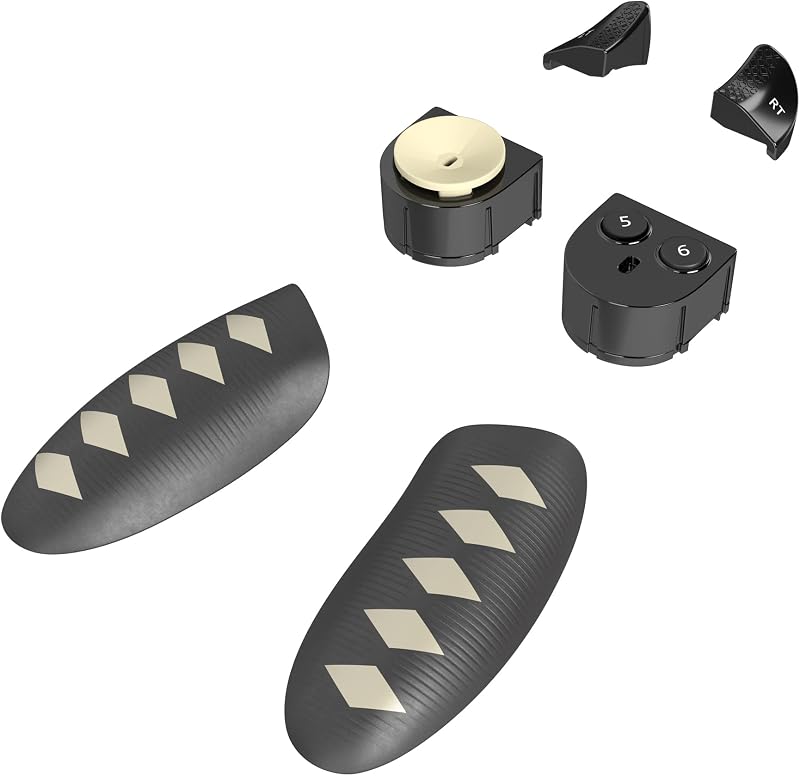
Best for: Modular gamepad tactical button upgrades
Pros
- Hot-swappable T-MOD components
- Reactive tact-switch modules
- Customizable software mapping
Cons
- Xbox and PC compatibility
- Gamepad modules not flight stick
The Thrustmaster ESWAP X Fighting pack is an accessory kit containing six specialized hardware modules designed exclusively for the ESWAP X Pro Controller base. Officially licensed for Xbox Series X|S, Xbox One, and Windows 10 PC systems, this modular package allows competitive console players to customize the physical layout of their gamepad. While console pilots exploring options for a dedicated thrustmaster ps5 flight controller often encounter different Thrustmaster peripheral categories, this pack focuses on traditional modular gamepad ergonomics rather than joystick flight mechanics.
The modules in this fighting pack are engineered with ultra-reactive tact switches that minimize response time and deliver crisp mechanical clicks. The package features a circular multidirectional D-pad for fluid directional execution, a dedicated two-button fighting module to streamline complex button combinations, and long alternative triggers that offer increased physical travel and enhanced finger leverage. Using Thrustmaster’s proprietary T-MOD hot-swap technology, players can remove and replace individual modules on their controller instantly during gameplay without needing external tools or taking apart the controller housing.
This hardware pack is suited for competitive console gamers who already own an ESWAP X Pro Controller and want tactile microswitch precision and customized button configurations. Thrustmaster offers free companion configuration software on compatible Xbox and PC platforms to adjust vibration strength, deadzones, and input mapping. However, because this product consists solely of modular replacement parts for an Xbox and PC gamepad, it does not function as an independent flight controller and does not support native PlayStation 5 console flight simulation, yielding to dedicated HOTAS hardware for aerial gameplay.
How to Choose the Right Thrustmaster Flight Sticks
Selecting the right flight hardware requires understanding the functional differences between an all-in-one flight controller, specialized rudder pedals, and mechanical cockpit mounting accessories. Console compatibility is the first critical checkpoint. The PlayStation 5 requires officially supported hardware to communicate directly with console simulation titles. If your primary goal is plugging directly into a PS5 console to play dogfighting games, the Thrustmaster T.FLIGHT HOTAS NEO ACE COMBAT is the only full flight stick in this selection offering official native PS5 compatibility out of the box. Modular gamepad components like the ESWAP X Fighting pack are engineered for Xbox Series X|S and PC ecosystems instead.
Cockpit layout and physical space represent the next major decision. The T.FLIGHT HOTAS NEO ACE COMBAT provides flexibility by featuring a detachable throttle unit. If you play from a couch, the stick and throttle can remain connected as a single rigid unit that rests securely across your lap. If you play at a desk, unbolting the two modules allows you to space them apart for an authentic posture. Pilots who want zero desk clutter or who need their hardware positioned at natural armrest height can integrate the Thrustmaster Flying Clamp, which securely lowers flight controllers below desk level using heavy-duty dual-screw metal clamps.
Yaw control preferences also dictate your hardware needs. While the T.FLIGHT HOTAS NEO provides two distinct methods for handling aircraft yaw—twisting the joystick’s Z-axis or rocking the throttle’s tilting lever—serious simulation enthusiasts often prefer dedicated foot pedals. Adding the Thrustmaster TFRP Flight Sim Rudder introduces an authentic sliding foot axis powered by four industrial aluminum rails. Separating yaw control to your feet relieves wrist fatigue and allows for precise micro-adjustments during challenging crosswind landings and formation maneuvers.
Finally, internal sensor technology determines long-term reliability and precision. Flight sticks that rely on traditional mechanical potentiometers can wear down and develop erratic deadzones over time. Thrustmaster’s H.E.A.R.T. system uses non-contact magnetic sensors to deliver sixteen-bit precision that maintains consistent tracking throughout years of aggressive dogfights. Understanding whether your setup requires a primary magnetic flight stick, floor rudder pedals, or rigid desk mounting ensures you assemble a balanced, comfortable console cockpit tailored to your flying style.
FAQ
Which Thrustmaster flight stick works natively on PS5?
The Thrustmaster T.FLIGHT HOTAS NEO ACE COMBAT is officially licensed and designed for native plug-and-play use on PlayStation 5, PlayStation 4, and PC. It connects directly to the console via USB without requiring third-party adapters or software converters.
Can the Thrustmaster TFRP rudder pedals be used on PS5?
Yes, the Thrustmaster TFRP Precision Flight Sim Rudder pedals are compatible with PlayStation 5, PlayStation 4, Xbox consoles, and PC. On consoles, the pedals typically connect directly into a compatible Thrustmaster flight stick base or through a dedicated USB adapter, depending on the game and cockpit configuration.
How does the dual rudder system work on the T.FLIGHT HOTAS NEO?
The dual rudder system provides two distinct ways to manage yaw without needing foot pedals. Pilots can rotate the joystick handle clockwise and counterclockwise using the integrated Z-axis, or they can use the tilting rocker lever located on the front of the detachable throttle.
Does the Thrustmaster Flying Clamp work with all flight controllers?
The Thrustmaster Flying Clamp is engineered primarily for Thrustmaster civil aviation (TCA) and T.16000M FCS flight products. While its all-metal structure and adjustable height brackets accommodate several Thrustmaster throttle and joystick bases, the listing specifies support for those particular simulation lines on PC and desktop setups.
Is the Thrustmaster ESWAP X Fighting pack suitable for PS5 flight simulation?
No, the ESWAP X Fighting pack is a set of six modular components designed specifically for the ESWAP X Pro Controller, which is an Xbox and PC gamepad. It does not provide flight stick functionality and is not designed for native PlayStation 5 console flight simulation.
What is the benefit of H.E.A.R.T. magnetic sensor technology?
Thrustmaster’s H.E.A.R.T. (HallEffect AccuRate Technology) utilizes non-contact magnetic sensors instead of traditional mechanical potentiometers. Because the internal components do not physically rub against each other during flight stick movement, the mechanism prevents wear and maintains sixteen-bit precision over extended use.


