As Amazon Associates, we earn from qualifying purchases. This means we may receive a small commission at no extra cost to you if you click through and make a purchase.
Lenovo occupies an unusual and versatile position in portable computing, manufacturing everything from enterprise-grade detachable workstations to ultra-slim media tablets designed for casual streaming. Shoppers looking for a slate from this catalog immediately encounter two entirely different hardware ideologies: the classic PC architecture engineered for legacy enterprise software and modern mobile platforms optimized for rapid touch interaction and extended battery endurance. Deciding on the right model requires weighing whether your day-to-day productivity depends on full desktop operating systems or the streamlined convenience of Android-driven mobile workflows.
While the business line prioritizes desktop application compatibility and hardware security, the consumer lineup separates into distinct tiers ranging from compact palm-sized readers to massive creative workstations equipped with advanced mobile silicon.
1 Lenovo ThinkPad X1 Tablet for Enterprise Productivity
 8.4/10
Lenovo ThinkPad X1 Tablet
Best for: Mobile business professionals needing full Windows
Pros
- Full Windows 10 Pro operating system
- Detachable Pogo keyboard and pen included
- Sharp 3000 x 2000 QHD display
- Hardware fingerprint reader
Cons
- Older processor generation
- Memory capped at 8GB
The Lenovo ThinkPad X1 Tablet is engineered specifically for professionals who require a genuine Windows environment in a detachable form factor. Operating on Windows 10 Pro 64-bit, this 2-in-1 notebook features a 1.9GHz Intel Core i7 8650U processor paired with 8GB of LPDDR3 memory and a 256GB solid-state drive featuring TCG Opal Encryption 2. Its 13-inch IPS touchscreen delivers a 3000 x 2000 QHD resolution powered by integrated Intel UHD Graphics 620. The package arrives ready for work with an included black Pogo keyboard, Pen Pro, battery pack, two webcams, and an integrated fingerprint reader for biometric hardware security.
Physical connectivity on this model mirrors full PC standards, providing two USB-C ports with Power Delivery 3.0, a 3.5mm audio combo jack, a dedicated pen holder slot, and a Micro SD card reader that supports optional microSDHC and microSDXC formats. Wireless networking is handled by an internal Intel 8265 802.11ac adapter paired with Bluetooth. The chassis weighs 300 grams according to the listing specifications, presenting a highly portable footprint for field audits, business travel, and office docking.
This model is built for the corporate user who must run desktop-specific software, legacy diagnostic tools, or complex spreadsheets that mobile operating systems cannot execute properly. However, users seeking all-day casual media consumption or mobile-first creative apps will find that the newer Android models in this guide offer faster wake times and touch-optimized interfaces. Those considering full desktop setups instead of detachable devices can compare these capabilities against a traditional lenovo 16 inch laptop to weigh desk ergonomics against field mobility.
Listing details (6 fields)
| Color | Black |
|---|---|
| Size | 13-13.99 inches |
| Dimensions | 0.393700787 x 0.393700787 x 0.393700787 inches |
| Weight | 0.661386786 Pounds |
| Product Group | Personal Computer |
| Binding | Personal Computers |
Copied from the Amazon product page, not measured here.
2 Lenovo Idea Tab for Campus Study and Note-Taking
 9.2/10
Lenovo Idea Tab
Best for: Students balancing research assignments with mobile gaming
Pros
- Expansive 12.7-inch 3K display
- Responsive 360Hz touch sampling rate
- Fast 45W quick charging support
- Google Gemini and Circle to Search
Cons
- Base storage limited to 128GB
Best for: Multitaskers wanting an expansive study canvas
Pros
- Generous 12.1-inch 2.5K display
- Balanced 8GB memory allocation
- Up to 13 hours battery life
- Includes Tab Pen and folio case
Cons
- USB 2.0 charging cable speed
Best for: Students seeking structured note-taking tools
Pros
- Fluid 90Hz 2.5K IPS screen
- Includes Tab Pen and folio case
- Quad Dolby Atmos speakers
- Circle to Search integration
Cons
- Limited 4GB onboard memory
- USB 2.0 interface
The Lenovo Idea Tab serves as a dedicated digital notebook designed for high school and college coursework. Built around an 11-inch 2.5K IPS touchscreen with a 90Hz refresh rate, this model presents clear text and smooth scrolling for lecture slides and textbooks. The display covers 72% NTSC and incorporates TÜV Rheinland Low Blue Light hardware technology to minimize visual fatigue during late-night study sessions. Internal hardware includes a MediaTek Dimensity 6300 processor, an integrated Arm Mali-G57 MC2 graphics coprocessor, 4GB of system memory, and 128GB of internal storage.
Academic workflows are supported by four pre-installed learning tools: Lenovo AI Note, Squid, Nebo, and MyScript Calculator. The tablet incorporates Circle to Search with Google, allowing students to circle diagrams, phrases, or equations using their fingertip or the bundled Lenovo Tab Pen to translate text or retrieve research without switching windows. Audio is delivered through quad speakers tuned by Dolby Atmos, while battery endurance reaches up to 12 hours of continuous YouTube playback, supported by a 20W charger. The retail package also provides a protective folio case and a USB-C 2.0 charging cable.
This configuration suits students who need an organized, digital binder for reading, writing, and multimedia lectures. Because it relies on 4GB of system memory, students planning to keep dozens of browser tabs open simultaneously alongside heavy multitasking may prefer stepping up to the Plus or Pro models in the Idea Tab line.
Listing details (6 fields)
| Color | Luna Gray |
|---|---|
| Size | 11" with Tab Pen and Folio Case |
| Dimensions | 6.54 x 10.02 x 0.28 inches |
| Weight | 1.05 pounds |
| Product Group | Personal Computer |
| Binding | Personal Computers |
Copied from the Amazon product page, not measured here.
3 Lenovo Yoga Tab AI Tablet for Premium Creative Performance
 9.8/10
Top score 9.8/10, scored 9.4/10 or higher
Lenovo
Our score: 9.8/10 Overwhelmingly positive
Lenovo Yoga Tab AI Tablet
Best for: Digital creators demanding top mobile performance
Pros
- Flagship Snapdragon 8 Gen 3 processor
- Fast 144Hz 3.2K display
- Substantial 12GB LPDDR5X RAM
- Latest Wi-Fi 7 connectivity
Cons
- Advanced capabilities exceed basic needs
The Lenovo Yoga Tab AI Tablet represents the highest performance tier among Lenovo’s consumer slates, engineered for creators and demanding multitaskers. Powered by the flagship Qualcomm Snapdragon 8 Gen 3 processor and Qualcomm Adreno 750 graphics, it pairs 12GB of LPDDR5X memory with 512GB of onboard storage. The 11.1-inch 3.2K LTPS IPS touchscreen operates at a 3200 x 2000 resolution with an ultra-smooth 144Hz refresh rate, 98% DCI-P3 color gamut coverage, 600 nits typical brightness, and up to 800 nits peak brightness for precision visual editing.
Creative efficiency is driven by the included Lenovo Tab Pen Pro, which provides haptic feedback, pen audio simulation, dual-tap tool switching, and low latency for detailed digital illustration. Hardware AI tools streamline content creation through features such as AI-assisted photo editing, smart writing support, and live transcription. Wireless connectivity features Wi-Fi 7 and Bluetooth 5.4, while physical interfaces include a 3-point Pogo pin connector and a USB-C 3.2 Gen 1 port running at 5Gbps with DisplayPort video output. The device weighs 1.01 pounds and comes bundled with a physical keyboard, a power adapter, a 256GB SD card, and a USB 7-in-1 hub.
This slate suits visual artists, digital designers, and traveling professionals who want desktop-grade mobile silicon combined with color-accurate display hardware. Its high-end specifications outmatch casual needs, making it excessive for shoppers who merely want a straightforward screen for evening entertainment.
Listing details (6 fields)
| Color | Gray |
|---|---|
| Size | 11.1"|12GB|256GB+256GB SD Card |
| Dimensions | 10.06 x 6.53 x 0.24 inches |
| Weight | 1.01 pounds |
| Product Group | Personal Computer |
| Binding | Personal Computers |
Copied from the Amazon product page, not measured here.
4 Lenovo Tab One for Lightweight Everyday Entertainment
 9.8/10
Top score 9.8/10, scored 9.4/10 or higher
Lenovo
Our score: 9.8/10 Overwhelmingly positive
Lenovo Tab One
Best for: Everyday casual streaming and travel reading
Pros
- Lightweight build under one pound
- Up to 12.5 hours streaming battery
- Includes folio case with stand
- Dolby Atmos dual speakers
Cons
- Standard HD resolution
- Restricted 64GB storage capacity
The Lenovo Tab One focuses squarely on portability, compact handling, and reliable streaming. Built with an 8.7-inch HD display running at a 60Hz refresh rate, it features 480 nits of brightness and an 86% screen-to-body ratio within a chassis that weighs under a single pound. Internal processing is powered by a MediaTek Helio G85 processor paired with 4GB of memory and 64GB of internal storage. The tablet runs Android 14 out of the box and is backed by two years of scheduled security patches.
Audio is produced by dual stereo speakers tuned by Dolby Atmos, while battery management delivers up to 12.5 hours of unplugged YouTube streaming. The charging system is designed to replenish power 15W faster than predecessor designs, reducing downtime when prepping for travel. For younger family members, the operating system includes Google Kids Space, providing curated books, apps, and videos through YouTube Kids. The package includes a protective folio case with an integrated viewing stand along with a MicroSD tray pin.
This model is ideal for casual readers, commuters, and parents seeking an affordable, compact media screen for road trips. Buyers who want an entry-level slate might also compare compact form factors against alternatives like lenovo lecoo tablets, though users requiring active stylus support for handwritten school notes should step up to the Idea Tab series.
Listing details (6 fields)
| Color | Gray |
|---|---|
| Size | Tab One |
| Dimensions | 4.91 x 8.31 x 0.22 inches |
| Weight | 0.704 Pounds |
| Product Group | Personal Computer |
| Binding | Personal Computers |
Copied from the Amazon product page, not measured here.
5 Lenovo Idea Tab Plus for Expanded Multitasking and Viewing
 9.2/10
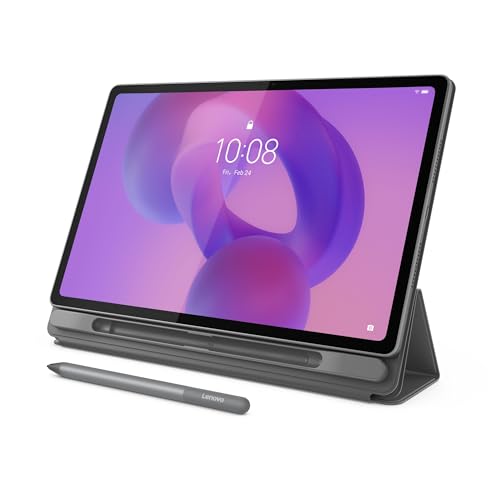
The Lenovo Idea Tab Plus expands the standard academic slate formula by introducing a larger 12.1-inch 2.5K IPS touchscreen. Operating at a 90Hz refresh rate, the panel covers 96% of the DCI-P3 color gamut and reaches up to 800 nits of brightness, paired with TÜV Rheinland Low Blue Light eye comfort certification. Under the hood, it features a MediaTek Dimensity 6400 processor, an integrated Arm Mali-G57 MC2 graphics processor, 8GB of memory, and 128GB of internal storage within a Luna Grey chassis weighing just over one pound.
Software productivity mirrors its smaller sibling with Google-powered Circle to Search and a dedicated suite of study applications including Lenovo Notepad, Squid, Nebo, and MyScript Calculator. Audio reproduction is handled by quad Dolby Atmos-tuned speakers, while battery life is rated for up to 13 hours of continuous YouTube streaming, complemented by quick charging. The device also supports seamless file sharing without cables, allowing users to drag and drop documents between compatible ecosystem devices. The factory package includes the Lenovo Tab Pen and a protective folio case.
This tablet suits users who find an 11-inch screen cramped for split-screen multitasking or sheet music reading. The step up to 8GB of RAM makes it significantly more capable when switching between heavy research documents, though it yields performance supremacy to the Pro model for graphics-intensive gaming.
Listing details (6 fields)
| Color | Luna Gray |
|---|---|
| Size | 12.1 inch w/o Folio Keyboard |
| Dimensions | 7.13 x 10.98 x 0.25 inches |
| Weight | 1.17 pounds |
| Product Group | Personal Computer |
| Binding | Personal Computers |
Copied from the Amazon product page, not measured here.
6 Lenovo Idea Tab Pro with Google for Advanced Academics and Gaming
 8.0/10
The Lenovo Idea Tab Pro with Google represents the largest and fastest entry in the educational lineup, equipped with a 12.7-inch 3K LCD display. Built to balance demanding coursework with competitive entertainment, the panel features Low Blue Light certification, mono and chromatic reading modes, a 360Hz touch sampling rate, and official PUBG certification for 90fps gaming. Computing power stems from an efficient MediaTek Dimensity 8300 processor, 8GB of RAM, 128GB of storage, and high-bandwidth Wi-Fi 6E connectivity.
The tablet integrates Google Gemini as a built-in AI assistant to assist with summarizing research, brainstorming, and structuring study materials. Users can leverage Circle to Search using their finger or the included Tab Plus Pen by pressing the home button to search directly from the display. Audio is powered by quad JBL speakers optimized with Dolby Atmos for superior dynamic range. Battery endurance provides up to 11 hours of video streaming, backed by rapid 45W quick charge technology. The bundle includes a folio case, Tab Plus Pen, USB-C cable, and a MicroSD tray pin.
This model is tailored for university students and power users who want a large-canvas device capable of handling high-speed gaming alongside intense research assignments. It gives way only to the Yoga Tab AI Tablet when professional creative color spaces and ultra-high memory bandwidth are non-negotiable requirements.
Listing details (6 fields)
| Color | Luna Grey |
|---|---|
| Size | Idea Tab Pro |
| Dimensions | 7.44 x 11.49 x 0.27 inches |
| Weight | 1.364 Pounds |
| Product Group | Personal Computer |
| Binding | Personal Computers |
Copied from the Amazon product page, not measured here.
How to Choose the Right Lenovo Tablets
Understanding the architectural divide between Windows 2-in-1s and Android mobile slates is the crucial first step when deciding which lenovo tablet to buy. If your daily routine requires enterprise software, specialized database tools, or corporate IT domain enrollment, a lenovo tablet thinkpad device like the ThinkPad X1 Tablet provides genuine desktop operating system functionality. Conversely, if your goals involve fast e-book browsing, streaming apps, mobile sketch tools, and all-day battery efficiency, the Android-powered Idea and Yoga models deliver a superior handheld experience.
Display dimensions dictate how each slate fits into your physical workspace. The 8.7-inch Lenovo Tab One slips easily into small bags and provides comfortable one-handed reading during daily transit. The 11-inch Idea Tab and 11.1-inch Yoga Tab balance desktop area with portability, fitting neatly on standard lecture hall desks. For those who frequently work in split-screen mode with a textbook open alongside a digital notebook, the 12.1-inch Idea Tab Plus and 12.7-inch Idea Tab Pro provide significantly wider canvases that reduce the need for constant scrolling.
Processing performance and system memory determine multitasking longevity across this catalog. Entry-level tasks like video playback and web browsing operate smoothly on the 4GB memory configurations found in the Tab One and base Idea Tab. However, sustained multitasking with multiple applications running concurrently benefits immensely from the 8GB configurations inside the Idea Tab Plus and Idea Tab Pro. Creative professionals working with layered illustrations or complex photo assets require the massive 12GB LPDDR5X allocation and Snapdragon 8 Gen 3 silicon found in the Yoga Tab AI Tablet.
Power management and charging speeds also separate these models based on how far you stray from wall outlets. While the ThinkPad relies on standard PC charging protocols, the modern mobile tablets offer continuous video playback ranging from 11 to 13 hours. If minimal downtime is essential, the Idea Tab Pro stands out with its 45W quick charge capability, whereas the base slates rely on 15W or 20W charging profiles. Evaluating storage capacities is equally important; if your archival needs surpass onboard solid-state memory, pairing your workflow with a dedicated storage machine like a lenovo laptop 1tb configuration ensures you never run out of drive capacity for heavy media collections.
FAQ
Does the Lenovo ThinkPad X1 Tablet run full Windows programs?
Yes, the Lenovo ThinkPad X1 Tablet runs a full 64-bit edition of Windows 10 Pro powered by an Intel Core i7 processor. This allows it to install and execute standard desktop software, enterprise applications, and legacy PC utilities, operating just like a traditional laptop when connected to its included Pogo keyboard.
What is the difference between the Lenovo Idea Tab and the Idea Tab Plus?
The primary differences lie in screen size, display brightness, processing hardware, and memory capacity. The standard Idea Tab features an 11-inch 2.5K screen, a Dimensity 6300 processor, and 4GB of RAM. The Idea Tab Plus upgrades to a larger 12.1-inch 2.5K panel reaching up to 800 nits brightness, a Dimensity 6400 processor, and 8GB of RAM for enhanced multitasking.
Are digital styluses and cases included in the box with these tablets?
Most models in this lineup include accessories directly in the package. The ThinkPad X1 Tablet includes its Pen Pro and detachable Pogo keyboard. The Idea Tab, Idea Tab Plus, and Idea Tab Pro include both a digital pen and a protective folio case. The Yoga Tab AI Tablet includes the Tab Pen Pro, keyboard, and a 7-in-1 hub, while the Tab One includes a folio stand case.
Which Lenovo tablet is best suited for mobile gaming?
The Lenovo Idea Tab Pro with Google is specially optimized for gaming with official PUBG certification for 90fps gameplay and a 360Hz touch sampling rate powered by the Dimensity 8300 processor. For maximum graphic horsepower, the Yoga Tab AI Tablet features the flagship Snapdragon 8 Gen 3 chipset and a 144Hz refresh rate.
Can I expand the storage on these Lenovo tablets?
Yes, the ThinkPad X1 Tablet includes a Micro SD reader supporting microSDHC and microSDXC cards. Similarly, the Idea Tab, Tab One, Idea Tab Plus, and Idea Tab Pro include dedicated MicroSD trays or tray pins in their packaging, allowing users to augment local file storage easily.


