As Amazon Associates, we earn from qualifying purchases. This means we may receive a small commission at no extra cost to you if you click through and make a purchase.
Intel established the Next Unit of Computing form factor to prove that desktop-grade performance could thrive inside a four-by-four-inch chassis without forcing users to sacrifice expansion or peripheral connectivity. In the compact workspace category, these machines set the benchmark for display versatility, commercial-grade remote management, and dual-channel memory speeds. Shoppers searching for a reliable intel mini pc regularly gravitate toward the Core i7 configurations because they pack high clock frequencies and multiple execution threads into footprints small enough to mount behind an office monitor.
While every desktop in this lineup is powered by an Intel Core i7 processor and enclosed in a miniature chassis, they differ across three processor generations spanning 11th Gen Willow Cove to 13th Gen Raptor Lake, factory memory capacities of 16GB versus 32GB, and physical case heights that dictate whether you can install a secondary 2.5-inch internal storage drive.
1 ASUS NUC 13 pro Intel NUC for Modern Business Workstations
 4.4buyers
ASUS NUC 13 Pro,Intel NUC 13
Best for: Multi-monitor trading desks and 8K displays
Pros
- Drives quad 4K or single 8K screen
- 32GB DDR4 expandable to 64GB
- Includes VESA mounting bracket
- Integrated hardware TPM 2.0 chip
Cons
- Slightly thicker 2.1-inch chassis
- Does not include 2.5-inch secondary drive

Best for: Heavy business multitasking and dual Thunderbolt setups
Pros
- 13th Gen 12-core hybrid processor
- Pre-installed 32GB RAM and 1TB SSD
- Dual Thunderbolt 4 and 2.5G LAN
- Intel NUC Pro Software Suite
Cons
- Lacks built-in SD card reader
- Higher power draw under full turbo
The ASUS NUC 13 pro Intel NUC brings contemporary 13th-generation architecture into an ultra-compact enclosure measuring 4.6 by 4.4 by 2 inches. Built around the Intel Core i7-1360P processor, this machine handles demanding office multitasking by utilizing up to 12 processing cores inside a balanced thermal envelope. The system arrives preloaded with Windows 11 Pro, making it an immediate drop-in solution for professional deployments that require commercial security standards and immediate compatibility with enterprise software suites.
Internal hardware specifications on this model, styled under the NUC13ANHi7 designation, emphasize sustained productivity. It comes equipped with 32GB of dual-channel DDR4-3200 SODIMM memory arranged across two 16GB sticks, with support for expansion up to 64GB. Storage is handled by a speedy 1024GB M.2 22×80 PCIe x4 Gen4 NVMe solid-state drive, accompanied by an additional M.2 22×42 key B slot configured for PCIe x1 Gen3, USB 3.2 Gen2, or SATA expansion. Networking and peripheral bandwidth are equally robust, featuring an Intel i226V 2.5Gbps Ethernet port, two rear Thunderbolt 4 ports with DisplayPort 2.1 and USB4 capability, dual HDMI 2.1 TMDS ports, and three USB 3.2 Gen 2 Type-A connectors alongside internal headers.
This desktop represents an ideal choice for corporate power users, edge computing installations, and multimedia professionals who want top-tier processing speeds without sacrificing physical desk space. It also includes the Intel NUC Pro Software Suite, which delivers hardware-level alarm clock control, hardware KVM features, and digital signage failover protection. For buyers who do not need internal 2.5-inch drive bays and prefer modern Gen4 NVMe performance, this machine easily stands out as a flagship contender.
Listing details (6 fields)
| Color | Black |
|---|---|
| Size | NUC13ANHi7 32+1TB |
| Dimensions | 4.6 x 4.4 x 2 inches |
| Weight | 1.41 Pounds |
| Product Group | Personal Computer |
| Binding | Personal Computers |
Copied from the Amazon product page, not measured here.
2 ASUS NUC 13 Pro,Intel NUC 13 for Quad-Display Multitasking Desks
 4.9buyers
Top buyer rating 4.9 average on Amazon, 4.7+ threshold
GEEK+
4.9/5 average from Amazon buyers Overwhelmingly positive
Intel NUC 13 Pro Arena Canyon
Best for: Compact digital signage and standard office deployments
Pros
- Slim NUC13ANKi7 space-saving design
- Modern 13th Gen Core i7-1360P CPU
- Dual Thunderbolt 4 with DP 2.1
- Remote enterprise software tools
Cons
- Starts with 16GB RAM and 512GB SSD
- No internal 2.5-inch drive bay
Users searching for an advanced multi-monitor command center will find an exceptional match in the ASUS NUC 13 Pro,Intel NUC 13. At its core sits the 13th Generation Intel Core i7-1360P hybrid processor, which pairs four Performance cores capable of turbo frequencies up to 5.0GHz with eight Efficient cores, yielding 16 total processing threads backed by 18MB of Intel Smart Cache. Operating at a moderate 35-watt power profile within a 4.6 by 4.4 by 2.1-inch chassis, it strikes an impressive balance between high-end calculating throughput and electrical efficiency.
Where this specific mini workstation excels is video output and external hardware connectivity. Through a combination of two HDMI 2.1 ports featuring consumer electronics control (CEC) and two Thunderbolt 4 ports transmitting DisplayPort 2.1 protocols, this machine can drive four simultaneous 4K displays at 60Hz or a single ultra-high-resolution 8K display. The integrated Intel Iris Xe graphics processor coordinates with 32GB of dual-channel DDR4-3200 memory to ensure smooth window transitions across extended screen real estate. Storage is anchored by a 1TB M.2 PCIe 4.0 NVMe drive, with two dedicated storage expansion slots available inside the chassis for secondary upgrades.
Financial analysts, trading desk operators, and commercial data supervisors will appreciate the integrated hardware TPM 2.0 security chip and the included VESA mounting bracket that allows the 1.4-pound unit to mount flush behind an office screen. Backed by a three-year manufacturer warranty covering the barebone chassis, factory-fitted memory, and solid-state drive, this configuration yields only to bulkier legacy models if an owner relies on older Mini DisplayPort cables or integrated full-sized memory card readers.
Listing details (4 fields)
| Color | Black |
|---|---|
| Size | NUC13ANKi7 16+512GB |
| Product Group | Personal Computer |
| Binding | Personal Computers |
Copied from the Amazon product page, not measured here.
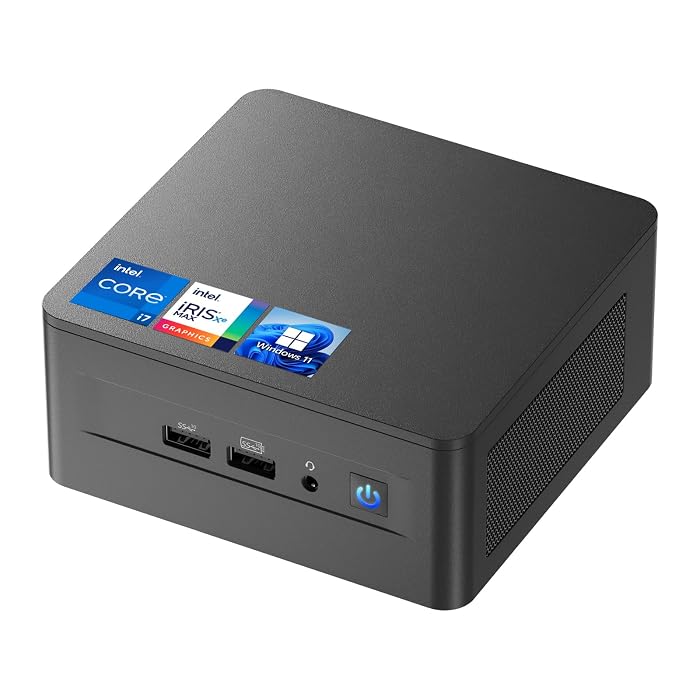
3 ASUS NUC 12Pro for Flexible Dual-Drive Storage Configurations
 4.3buyers
ASUS NUC 12Pro
Best for: Users needing dual NVMe and SATA storage
Pros
- Accommodates internal 2.5-inch secondary drive
- Fast tri-band WiFi 6E and Bluetooth 5.3
- 12-core Core i7-1260P processor
- 3-year warranty with VESA mount
Cons
- HDMI limited to 2.0 spec
- Older 12th Gen processor
The ASUS NUC 12Pro represents an exceptionally versatile option for users who want modern hybrid architecture while retaining backward compatibility for traditional high-capacity drives. Centered around the 12th-generation Intel Core i7-1260P processor, this machine features 12 cores split into four Performance cores and eight Efficient cores with 16 threads, reaching boost clocks up to 4.8GHz. An active air-cooling system maintains consistent operating temperatures throughout prolonged office productivity sessions.
Expandability is one of the strongest reasons to choose this NUC12WSHi7 platform. In addition to its factory-installed 32GB of DDR4-3200 SODIMM RAM (expandable up to 64GB) and 1TB PCIe 4.0 NVMe solid-state drive, the taller two-inch chassis is engineered to house an additional 2.5-inch PCIe Gen4 SSD or SATA hard drive. This dual-drive capability lets users run their operating system and critical applications on the ultra-fast NVMe slot while routing large local media archives, system backups, or virtual disk images to an economical secondary 2.5-inch drive bay.
Connectivity options cover every modern networking standard, incorporating tri-band WiFi 6E across 2.4GHz, 5GHz, and 6GHz bands, Bluetooth 5.3, and a 2.5 Gigabit Ethernet port for high-bandwidth local area networks. Display options remain extensive with two HDMI 2.0 ports and two Thunderbolt 4 connections capable of driving up to four 4K displays or a single 8K monitor. While it steps down slightly from 13th-generation single-thread speeds, it delivers unbeatable storage versatility for users managing heavy local file libraries.
Listing details (6 fields)
| Color | Black |
|---|---|
| Size | CORE i7 32+1TB |
| Dimensions | 4.6 x 4.4 x 2 inches |
| Weight | 1.41 pounds |
| Product Group | Personal Computer |
| Binding | Personal Computers |
Copied from the Amazon product page, not measured here.
4 Intel NUC 13 Pro Arena Canyon for Streamlined Enterprise Deployments
 4.1buyers
For fleet managers and office administrators requiring modern 13th-generation compute power in an essential corporate configuration, the Intel NUC 13 Pro Arena Canyon provides an exceptionally focused solution. Outfitted with the Intel Core i7-1360P processor, this NUC13ANKi7 model leverages the Arena Canyon platform to handle rigorous business computing, administrative multitasking, and automated office workflows. It comes straight out of the box with Windows 11 Pro installed, providing immediate security compliance and network join capability.
Unlike the larger 32GB configurations in this guide, this unit features 16GB of DDR4-3200 SODIMM RAM and a 512GB M.2 PCIe NVMe solid-state drive. Because the dual memory slots support upgrades up to 64GB, IT departments can acquire a cost-conscious baseline unit today and expand memory capacity as workload demands escalate. Storage can also be augmented via an internal M.2 22×42 key B slot that accommodates PCIe x1 Gen3, USB 3.2, or SATA secondary modules. The system retains the full I/O array of its sibling models, incorporating dual Thunderbolt 4 ports, dual HDMI 2.1 TMDS connectors, and Intel i226V 2.5Gbps wired networking.
This desktop is an outstanding fit for front-desk reception terminals, digital signage controllers, classroom workstations, and corporate cubicles where massive onboard storage is unnecessary because data resides in the cloud. It features the Intel NUC Pro Software Suite for remote power management, hardware alarm timers, and boot redirection. Users running heavy creative suites or complex local databases should step up to the 32GB and 1TB tiers, but for standard enterprise productivity, this unit delivers pure 13th-gen speed in a clean package.
Listing details (6 fields)
| Color | Black |
|---|---|
| Size | ASUSNUC13ANHi7 32GB+1024GB |
| Dimensions | 4.6 x 4.4 x 2.1 inches |
| Weight | 1.41 Pounds |
| Product Group | Personal Computer |
| Binding | Personal Computers |
Copied from the Amazon product page, not measured here.
5 Intel NUC 12 Pro Business Mini for Quiet 24/7 Operations
 4.4buyers
Best for: Always-on office workstations needing quiet operation
Pros
- Engineered for 24/7 quiet operation
- Secondary 2.5-inch drive expansion
- 32GB DDR4 and 1TB NVMe SSD
- Tri-band WiFi 6E and 2.5G Ethernet
Cons
- 12th-generation processing platform
- Chassis height larger than slim models
The Intel NUC 12 Pro Business Mini is built specifically for users who need a dependable desktop engine that can run continuously without intrusive fan noise. Driven by the 12th-generation Intel Core i7-1260P processor, it delivers 12 physical cores (four Performance cores and eight Efficient cores) and 16 execution threads with an 18MB L3 cache and clock speeds reaching up to 4.7GHz. The manufacturer highlights 24/7 quiet operation, making it ideal for noise-sensitive shared offices, home studios, or living-area work desks.
System memory and storage are fully equipped from day one. You receive 32GB of dual-channel DDR4-3200 SODIMM RAM alongside a 1TB PCIe 4.0 NVMe SSD. For users with expanding data requirements, the NUC12WSHi7 chassis accepts an additional internal 2.5-inch solid-state drive or mechanical SATA hard drive. Networking performance is thoroughly up to date with tri-band WiFi 6E supporting 2.4GHz, 5GHz, and 6GHz channels, low-latency Bluetooth 5.3, and a 2.5 Gigabit Ethernet port for ultra-fast local network transfers.
With four USB 3.2 Gen 2 Type-A ports, two HDMI 2.0 ports, and two Thunderbolt 4 ports offering DisplayPort 2.1 protocol compatibility, this unit easily powers quad-screen productivity or 8K HDR visual output. It suits home lab hosts, small-business accounting stations, and continuous background data collection setups that demand uninterrupted uptime. It yields only to 13th-generation units for buyers chasing the absolute highest single-core burst speeds, and it provides an exceptional balance of acoustic comfort and raw multi-threaded power.
Listing details (3 fields)
| Color | NUC12WSHi7 32GB+1TB |
|---|---|
| Product Group | Personal Computer |
| Binding | Personal Computers |
Copied from the Amazon product page, not measured here.
6 Intel NUC 11 NUC11PAHi7 Panther Canyon for Legacy Connections and Media Creators
 4.2buyers
Best for: Photographers and audio conferencing setups
Pros
- Integrated UHS-II SDXC card reader
- Built-in quad-microphone array
- Thunderbolt 3 with fast charging
- Dedicated Mini DisplayPort connector
Cons
- Older 11th Gen 4-core processor
- Heavier 3.1-pound chassis weight
The Intel NUC 11 NUC11PAHi7 Panther Canyon occupies a distinct and practical niche within the lineup, pairing 11th-generation Intel Core i7-1165G7 processing with specialized hardware features missing from newer designs. The four-core, eight-thread processor pairs with 32GB of DDR4 system RAM and a 1TB M.2 solid-state drive to deliver smooth everyday office performance, casual multimedia entertainment, and web productivity inside a compact 4.6 by 4.4 by 2-inch black enclosure.
What sets this Panther Canyon model apart from newer 12th and 13th-generation units is its specialized peripheral array. It features a built-in, full-size SDXC card slot with UHS-II bus support directly on the side of the chassis, allowing photographers, videographers, and content creators to ingest camera media without hunting for external adapters. Furthermore, the front panel integrates a beam-forming, far-field quad-microphone array, making it uniquely qualified for voice-controlled office environments, conference calls, and desktop collaboration without requiring a separate USB desktop microphone.
Display and external expansion remain extraordinarily versatile with an HDMI 2.0b port, a dedicated Mini DisplayPort 1.4 connection, and two Thunderbolt 3 ports with fast-charging support. Like the other taller NUC enclosures, it also accommodates a secondary 2.5-inch internal SSD if you require bulk media storage. Although it utilizes an earlier 11th-generation CPU architecture that yields raw multi-core computing power to newer hybrid chips, its built-in SDXC reader, integrated microphone array, and diverse display outputs make it a remarkably convenient all-in-one hub for media desks.
Listing details (6 fields)
| Color | Black |
|---|---|
| Size | NUC11PAHi7 32GB+1TB |
| Dimensions | 4.6 x 4.4 x 2 inches |
| Weight | 3.1 pounds |
| Product Group | Personal Computer |
| Binding | Personal Computers |
Copied from the Amazon product page, not measured here.
How to Choose the Right Intel Mini PC
Selecting the best model from this lineup requires matching processor generation, memory capacity, and physical chassis design to your actual daily workflow. Shoppers comparing these desktop powerhouses against mobile hardware like an intel core i5 laptop lenovo should remember that a mini PC prioritizes continuous thermal cooling, full-sized desktop I/O port selection, and non-soldered RAM expansion rather than an integrated keyboard and battery.
The first major decision point is processor architecture. The 13th Gen Intel Core i7-1360P models, such as the ASUS NUC 13 pro Intel NUC and the Intel NUC 13 Pro Arena Canyon, feature 12 cores combining dedicated Performance and Efficient cores. This hybrid setup excels at juggling simultaneous background processes, heavy spreadsheet compilation, and high-resolution media multitasking. The 12th Gen Core i7-1260P models, including the ASUS NUC 12Pro and Intel NUC 12 Pro Business Mini, provide nearly identical core counts with slightly lower clock ceilings, delivering plenty of computing power for heavy professional tasks. Meanwhile, the 11th Gen Core i7-1165G7 inside the Panther Canyon features a quad-core architecture best suited for standard business duties, media playback, and conference workstations.
Chassis height and drive expandability represent the next critical choice. Models bearing the “H” designation in their model codes, like the NUC13ANHi7, NUC12WSHi7, and NUC11PAHi7, offer a slightly taller two-inch case height specifically designed to house a secondary 2.5-inch SATA or PCIe solid-state drive beneath the motherboard. In contrast, slim “K” variants, such as the NUC13ANKi7 Arena Canyon, eliminate the 2.5-inch bay to achieve a more streamlined profile, relying instead on secondary M.2 slots for storage expansion. Shoppers exploring alternative compact form factors, including a beelink mini pc, should always verify internal drive-bay dimensions before purchasing supplementary storage.
Finally, inspect display configurations and specialized peripheral requirements. If you intend to operate four independent 4K monitors or a cutting-edge 8K display, the 12th and 13th-generation models provide dual Thunderbolt 4 and dual HDMI connectors. However, if your daily workflow revolves around ingesting photos from camera memory cards or participating in room-scale voice meetings, the Panther Canyon’s integrated UHS-II SDXC slot and built-in quad-microphone array deliver built-in hardware conveniences that newer minimalist chassis designs leave out.
FAQ
Which Intel NUC i7 model is best for everyday multitasking?
The ASUS NUC 13 pro Intel NUC and the ASUS NUC 13 Pro,Intel NUC 13 are the strongest performers for intensive multitasking. Powered by the 13th Gen Intel Core i7-1360P processor with 12 hybrid cores and 16 threads paired with 32GB of DDR4 memory, they handle massive browser tab counts, heavy spreadsheets, and simultaneous video calls without slowing down.
Can I upgrade the RAM and storage on an Intel NUC i7 mini PC?
Yes, all of the Intel NUC models reviewed here feature accessible internal expansion. The DDR4 SODIMM memory slots support upgrades up to 64GB across two channels. The primary M.2 PCIe NVMe solid-state drive can also be upgraded, and the taller chassis versions include space for an additional 2.5-inch drive or secondary M.2 expansion card.
What is the difference between NUC tall and slim chassis models?
The main physical distinction lies in chassis height and internal secondary drive support. Tall models, often marked with an “H” such as NUC13ANHi7 or NUC12WSHi7, measure approximately two inches tall to fit an internal 2.5-inch SATA or PCIe drive bay. Slim versions, designated with a “K” like the NUC13ANKi7 Arena Canyon, use a thinner casing designed purely for M.2 solid-state storage.
How many external monitors can an Intel Core i7 NUC support?
The 12th and 13th-generation Intel NUC i7 mini PCs featured here can drive up to four independent 4K displays at 60Hz simultaneously by utilizing their dual HDMI ports and dual Thunderbolt 4 ports. They also support a single ultra-high-resolution 8K monitor via the Thunderbolt DisplayPort protocols.
Do these Intel NUC mini PCs include Windows pre-installed?
Yes, every Intel NUC model in this guide arrives pre-installed with Windows 11 Pro. This allows immediate setup straight out of the box with commercial-grade security features like BitLocker encryption and seamless integration into domain-managed office environments.


