As Amazon Associates, we earn from qualifying purchases. This means we may receive a small commission at no extra cost to you if you click through and make a purchase.
As an Amazon Associate we earn from qualifying purchases. Links on this page are affiliate links.
When comparing the dji rs 2 combo vs rs 3 pro combo, you are looking at two professional 3-axis stabilizers from DJI. Both units share a carbon fiber construction and a 10 lb tested payload capacity. They are designed for DSLR and mirrorless cameras. The main difference lies in their control systems and connectivity. The RS 2 relies on a touchscreen and standard app control, while the RS 3 Pro introduces automated axis locks and long-range O3 Pro video transmission for more advanced workflows.
Axis Locks
Manual
Automated
Display
1.4-inch full-color touchscreen
Not listed
Video Transmission
Standard (2.4 GHz)
O3 Pro (up to 6km)
Weight
2.87 pounds
3.84 pounds
Camera Compatibility
DSLR, mirrorless
DSLR, cinema
Choose the first if
- You prefer a lighter unit for extended handheld shooting.
- You want direct control via a built-in touchscreen.
- You primarily use mirrorless and DSLR cameras.
Choose the second if
- You need automated axis locks for faster setup.
- You require long-range video transmission up to 6km.
- You work with heavy cinema camera setups.
Verdict
The DJI RS 2 Combo is a lighter, more traditional option with a touchscreen for direct adjustments. The RS 3 Pro is heavier but offers automated locks and superior long-range transmission for professional cinema work. Choose the RS 2 for standard mirrorless setups and the RS 3 Pro for advanced, heavy-duty productions.
DJI RS 2 vs RS 3 Pro Specs
Built-in Display
Edge: DJI RS 2 Combo Carbon Fiber Gimbal
The DJI RS 2 Combo features a 1.4-inch full-color touchscreen integrated directly into the handle. This display allows you to adjust gimbal parameters and access ActiveTrack 3.0 without needing a phone. The RS 3 Pro Combo does not list an onboard display in its specifications. You must rely on the DJI Ronin app on a connected mobile device to control settings and view the camera feed on the RS 3 Pro. For users who prefer tactile adjustments without a phone, the RS 2 screen is a practical advantage.
Axis Locks
Edge: DJI RS 3 Pro Carbon Fiber Gimbal
The RS 3 Pro Combo includes automated axis locks. You can lock and unlock all three axes with a single press of the power button, which speeds up setup and storage. The DJI RS 2 Combo relies on manual axis locking mechanisms. You must physically engage each lock by hand. Automated locks reduce the time spent balancing and securing the gimbal for transport. If you frequently switch between shooting and packing, the automated system on the RS 3 Pro offers a clear efficiency gain.
Transmission Range
Edge: DJI RS 3 Pro Carbon Fiber Gimbal
The RS 3 Pro Combo supports O3 Pro video transmission with a range of up to 6km or 20,000ft. This allows for low-latency control and monitoring from a distance. The DJI RS 2 Combo specifications list an operating frequency of 2.4 GHz but do not specify a long-range transmission capability or distance. The RS 3 Pro is better suited for scenarios where you need to control the gimbal from far away, such as when using vehicle mounts or jibs.
Total Weight
Edge: DJI RS 2 Combo Carbon Fiber Gimbal
The DJI RS 2 Combo weighs 2.87 pounds according to its specifications. The RS 3 Pro Combo weighs 3.84 pounds. The RS 3 Pro includes the gimbal, battery handle, and dual-layer quick release plates in its weight calculation. The RS 2 is lighter overall. If you are carrying the gimbal for long periods or need a lighter handheld setup, the RS 2 Combo provides a weight advantage. The extra weight on the RS 3 Pro comes from its additional battery handle and electronic components.
Camera Compatibility
Edge: DJI RS 3 Pro Carbon Fiber Gimbal
The RS 2 Combo is listed as compatible with DSLR and mirrorless cameras. The RS 3 Pro Combo is described as compatible with DSLR and cinema cameras. The RS 3 Pro features extended carbon fiber axis arms to accommodate larger professional setups like the Sony FX6 or Canon C70. While both handle 10 lb payloads, the RS 3 Pro is explicitly designed for heavier cinema bodies and larger lenses. If you use cinema cameras, the RS 3 Pro offers better physical compatibility.
Which DJI Gimbal Combo Fits You
You want fast setup with automated locks
Our pick: DJI RS 3 Pro Carbon Fiber Gimbal
The RS 3 Pro Combo includes automated axis locks. You press the power button to lock and unlock the three axes. This feature significantly improves the speed of transitions and storage. You save time balancing your camera gear between shoots. The automated mechanism reduces manual adjustment steps. This efficiency is key for professionals who move quickly between locations.
You need direct touchscreen control for ActiveTrack
Our pick: DJI RS 2 Combo Carbon Fiber Gimbal
The DJI RS 2 Combo has a 1.4-inch full-color touchscreen. You can adjust parameters and access ActiveTrack 3.0 directly on the device. This frees your creative control without needing a connected phone. The integrated LCD screen allows quick access to features. You maintain full operation even if your mobile device is not available or connected.
You prioritize long-range wireless video transmission
Our pick: DJI RS 3 Pro Carbon Fiber Gimbal
The RS 3 Pro Combo supports O3 Pro video transmission. It offers a range of 6km or 20,000ft with ultra-low latency. You get impressive stability and extensive coordinated control features. This long-range capability allows you to operate the gimbal from a distance. The transmission includes both video and audio signals for professional monitoring.
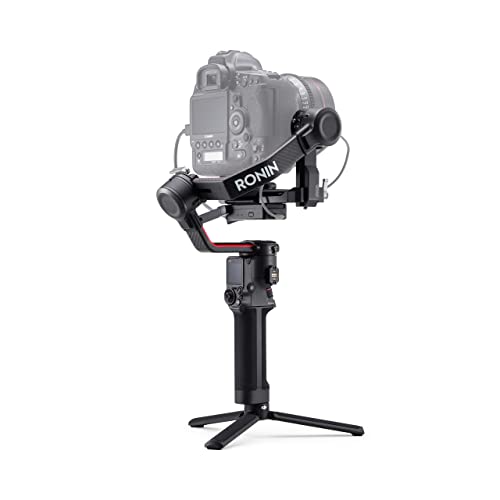
DJI RS 2 Combo Carbon Fiber Gimbal
Best for: heavy camera stabilization
- Payload Capacity
- 10 lbs
- Camera Compatibility
- DSLR, mirrorless
- Number of Axes
- 3-axis
- Display Feature
- 1.4-inch full-color touchscreen
- Material
- Carbon Fiber
- Dimensions
- 10.2 × 10.4 × 2.8 inches
The DJI RS 2 Combo is a 3-axis gimbal stabilizer built with carbon fiber axis arms. It weighs 2.87 pounds and supports a 10 lb tested payload. You get a 1.4-inch full-color touchscreen for adjusting parameters and using ActiveTrack 3.0 directly. The dual-layer mounting plate fits Manfrotto and Arca-Swiss standards. This setup suits professionals who need high payload capacity and precise balancing for DSLR and mirrorless cameras.
- 10 lb tested payload capacity
- Monocoque carbon fiber axis arms
- 1.4-inch full-color touchscreen display
- Dual-layer Arca-Swiss compatible plate
- Heavier build at 2.87 pounds
- Smaller 1.4-inch display size
- Lower payload than newer models
- You need to stabilize heavy camera rigs
- You prefer a physical touchscreen interface
- You use Arca-Swiss mounting plates
- You prioritize the lightest possible weight
- You want the latest 4K video features
- You need a larger display screen
Verdict: The DJI RS 2 Combo Gimbal fits professionals who need to stabilize heavy DSLR or mirrorless setups. Its high payload capacity and carbon fiber construction make it a reliable tool for demanding shoots.

DJI RS 3 Pro Carbon Fiber Gimbal
Best for: heavy cinema camera stabilization
- Payload Capacity
- 4.5 kg (10 lbs)
- Camera Compatibility
- DSLR, cinema
- Number of Axes
- 3-axis
- Axis Locks
- Automated
- Color
- Black
- Material
- Carbon Fiber
The DJI RS 3 Pro Combo is a 3-axis gimbal stabilizer designed for DSLR and cinema cameras. It features automated axis locks for quick setup and extended carbon fiber arms. The unit supports a tested payload of 4.5 kg (10 lbs) and includes long-range O3 Pro video transmission. This system suits professionals needing to carry heavy camera rigs while maintaining stability and control over long distances.
- Automated axis locks for faster transitions
- 4.5 kg (10 lbs) tested payload capacity
- Extended carbon fiber axis arms for larger cameras
- 6 km (20,000 ft) video transmission range
- Heavier at 3.84 pounds compared to lighter alternatives
- Larger physical dimensions with a 10.4-inch height
- You need to stabilize heavy cinema camera setups
- You require long-range wireless control for your shots
- You want automated axis locking for efficiency
- You prioritize a lightweight and compact carry size
- You only use small mirrorless cameras with light lenses
- You need a budget-friendly entry-level stabilizer
Verdict: The DJI RS 3 Pro Combo Gimbal fits professionals who need to stabilize heavy cinema cameras and require long-range transmission capabilities. Its robust payload capacity and automated features make it ideal for demanding production environments.
Specifications side by side
| Spec | DJI RS 2 Combo Carbon Fiber Gimbal | DJI RS 3 Pro Carbon Fiber Gimbal |
|---|---|---|
| Payload Capacity | 10 lbs | 4.5 kg (10 lbs) |
| Camera Compatibility | DSLR, mirrorless | DSLR, cinema |
| Number of Axes | 3-axis | 3-axis |
| Display Feature | 1.4-inch full-color touchscreen | – |
| Axis Locks | – | Automated |
| Color | Not Available | Black |
| Features | Touchscreen | – |
| Material | Carbon Fiber | Carbon Fiber |
| Compatible Device | DSLR | DSLR |
| Dimensions | 10.2 × 10.4 × 2.8 inches | 10.2 × 2.76 × 10.4 inches |
| Weight | 2.87 pounds | 3.84 pounds |
| Size | DJI RS 2 Combo | 6.25 |
| Model | CP.RN.00000094.01 | CP.RN.00000218.01 |
Frequently asked questions
What is the main weight difference between the DJI RS 2 and RS 3 Pro?
The RS 3 Pro Combo weighs 3.84 pounds, while the RS 2 Combo weighs 2.87 pounds. This makes the RS 3 Pro heavier by nearly one pound. You should consider this extra weight if you plan to carry the gimbal for long periods. The difference comes from the RS 3 Pro's additional internal components and automated locking mechanisms.
Which gimbal supports cinema cameras better?
The RS 3 Pro Combo supports both DSLR and cinema cameras. The RS 2 Combo lists compatibility only with DSLR cameras. If you use heavy cinema rigs, the RS 3 Pro is the better choice. Its higher payload capacity and design cater to professional cinema production environments where heavy lenses and bodies are common.
Do both models feature a touchscreen display?
Yes, both gimbals include a touchscreen display. The RS 2 Combo has a 1.4-inch full-color touchscreen integrated into the handle. The RS 3 Pro also features a touchscreen interface. This allows you to adjust settings and access features like ActiveTrack without needing to connect a smartphone or external controller.
Is the DJI RS 3 Pro lighter than the RS 2?
No, the RS 3 Pro is heavier. It weighs 3.84 pounds compared to the RS 2 Combo's 2.87 pounds. The RS 3 Pro's increased mass comes from its robust build and automated axis locks. If minimizing weight is your top priority, the RS 2 Combo is the lighter option for your setup.
Can I use the RS 2 with mirrorless cameras?
The product data lists the RS 2 Combo as compatible with DSLR cameras. However, the general comparison notes it is designed for DSLR or mirrorless setups. The RS 3 Pro explicitly lists both DSLR and cinema cameras. For confirmed compatibility with specific mirrorless models, you should verify the payload limits against your specific camera body.
What is the maximum payload for these gimbals?
Both the RS 2 Combo and the RS 3 Pro Combo have a tested payload capacity of 10 pounds. This limit applies to the total weight of your camera, lens, and mounting accessories. Ensure your entire rig stays under this limit to maintain stabilization performance. Both units are built to handle heavy professional equipment within this range.
Does the RS 3 Pro have automated locks?
Yes, the RS 3 Pro Combo includes automated axis locks. You can lock and unlock the three axes by simply pressing the power button. This feature speeds up setup and storage times. The RS 2 Combo does not list this automated feature in its data, requiring manual locking of the axes.

