As Amazon Associates, we earn from qualifying purchases. This means we may receive a small commission at no extra cost to you if you click through and make a purchase.
Dell has earned a strong reputation in desktop computing by manufacturing monitors that act as complete workstation hubs. Across its UltraSharp and everyday series, the brand focuses on combining factory-calibrated color panels with integrated docking features. By carrying high-resolution video, peripheral data, and laptop charging over a single cord, a Dell thunderbolt monitor reduces desk clutter while providing accurate color across standard gamuts like Display P3 and sRGB.
Across these six displays, Dell differentiates its lineup through screen sizes from 27 to 40 inches, resolutions from QHD to 5K2K, and charging capacities ranging from 65W USB-C up to 140W Thunderbolt 4 hubs for power-heavy laptops.
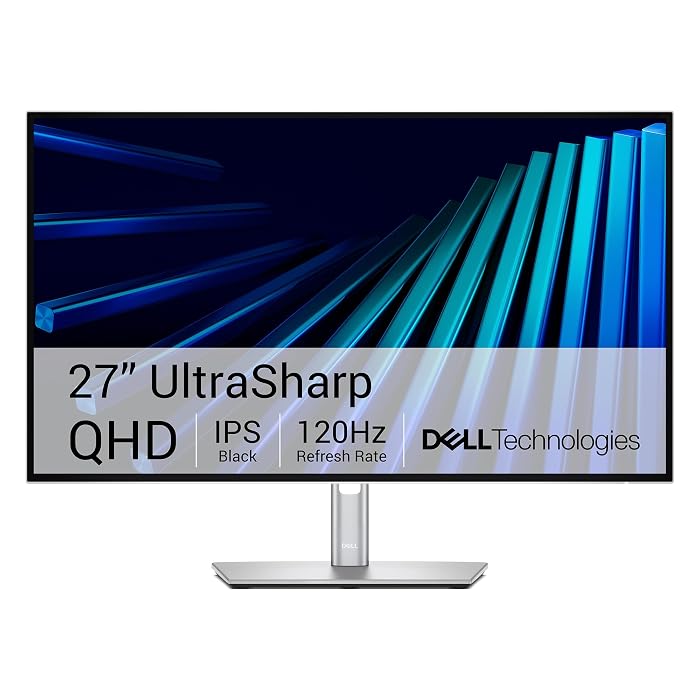
1 Dell UltraSharp 27 Thunderbolt Hub Monitor for Clean Desk Setups
 9.8/10
Top score 9.8/10, scored 9.4/10 or higher
Dell
Our score: 9.8/10 Overwhelmingly positive
Dell UltraSharp 27 Thunderbolt Hub Monitor
Best for: Creators needing color accuracy and built-in KVM
Pros
- 98% Display P3 coverage
- Integrated KVM switch
- 90W Thunderbolt 4 charging
- Smooth 120Hz refresh rate
Cons
- QHD resolution rather than 4K
The Dell UltraSharp 27 Thunderbolt Hub Monitor (model U2726DER) is a dedicated desktop hub designed for creators and developers seeking dependable color fidelity and clean cable management. Equipped with a 27-inch matte IPS LCD panel with QHD resolution in a 16:9 aspect ratio, it offers 98% Display P3 coverage and factory-calibrated color accuracy. A 2000:1 contrast ratio delivers deep black levels, while a 120Hz refresh rate ensures smooth cursor tracking and page navigation during intensive workflows.
Connectivity is the core strength of this dell ultrasharp thunderbolt hub monitor. A single Thunderbolt 4 cable links your laptop to carry video, peripheral data, and up to 90W of power delivery simultaneously, eliminating standalone chargers. Multitaskers can switch between two machines using a single keyboard and mouse via the built-in KVM switch, while the light ash finish and borderless bezels maintain a refined aesthetic in executive spaces.
Dell validated this display with macOS, making the dell u2726der an appealing match for Mac users who can adjust settings using the Dell Display and Peripheral Manager app. While its 350-nit brightness suits indoor desks, users who require 4K pixel density for high-resolution editing will prefer the U2725QE. For creators and coders wanting a fluid QHD hub with integrated switching, this model delivers reliable daily utility.
Listing details (6 fields)
| Color | Silver |
|---|---|
| Size | U2726DER |
| Dimensions | 7.57 x 24.1 x 15.18 Inches |
| Weight | 16.25 pounds |
| Product Group | Personal Computer |
| Binding | Personal Computers |
Copied from the Amazon product page, not measured here.
2 Dell UltraSharp U2725QE 27-Inch 4K UHD for Detailed Color Precision
 8.8/10
Dell UltraSharp U2725QE 27-Inch 4K UHD
Best for: Power users wanting 4K clarity and high charging
Pros
- Crisp 4K UHD IPS Black panel
- Up to 140W power delivery
- Thunderbolt 4 daisy chain support
- Factory-calibrated Delta E under 1.5
Cons
- Standard widescreen aspect without ultrawide width
The Dell UltraSharp U2725QE 27-Inch 4K UHD brings high-definition clarity to professionals demanding precision. Featuring a 27-inch 3840 x 2160 IPS Black panel, the dell u2725qe achieves 99% DCI-P3 color coverage calibrated to a Delta E under 1.5. Visual performance is enhanced by VESA DisplayHDR 600, an anti-glare matte finish, and a 450-nit brightness rating. The listing notes contrast reaching up to 3000:1 alongside IPS Nano Color technology, generating noticeably deeper shadows than standard office displays.
As a capable dell thunderbolt 4 monitor, the U2725QE operates as an enterprise-grade docking hub. Its primary Thunderbolt 4 port provides up to 140W of simultaneous laptop charging, easily powering demanding mobile workstations while routing video and data. You can daisy-chain up to two additional 4K monitors directly from the unit. With HDMI 2.1, USB-C, USB-A, and Ethernet ports built into the frame, this display eliminates the need for an external anker 14 in 1 docking station.
Ergonomic adjustability covers height, tilt, swivel, and pivot adjustments. A 120Hz refresh rate and 5ms response time maintain fluid visuals, while ComfortView Plus and an ambient light sensor reduce eye fatigue over long shifts. Backed by Dell’s 3-year Advanced Exchange warranty, this screen is an ideal upgrade for photographers, editors, and engineers who prioritize 4K resolution on a 27-inch display.
Listing details (6 fields)
| Color | UHD-120Hz |
|---|---|
| Size | 27.0 inches |
| Dimensions | 2.18897637572 x 24.11023619588 x 13.91732282045 inches |
| Weight | 21.4289318664 Pounds |
| Product Group | Personal Computer |
| Binding | Personal Computers |
Copied from the Amazon product page, not measured here.
3 Dell UltraSharp 34 Curved Thunderbolt Hub for Expansive Multitasking
 8.0/10
Dell UltraSharp 34 Curved Thunderbolt Hub
Best for: Multitaskers needing ultrawide curved screen space
Pros
- Expansive 34.1-inch curved canvas
- IPS Black 2000:1 contrast ratio
- Built-in KVM and Ethernet
- 98% Display P3 coverage
Cons
- Listing does not specify refresh rate
The Dell UltraSharp 34 Curved Thunderbolt Hub (model U3426WER) provides an expansive ultrawide workspace for professionals who prefer a single continuous panel over split-screen dual monitors. Its 34.1-inch curved matte display uses a 21:9 aspect ratio and QHD Ultra Wide 1440p resolution, wrapping wide video timelines, code editors, and spreadsheets comfortably across your peripheral vision.
Utilizing an IPS Black panel, the dell u3426wer delivers a 2000:1 contrast ratio that preserves rich shadow details across wide viewing angles. The monitor is tuned for color work with 98% Display P3 coverage and factory calibration at Delta E under 2. For multi-device workflows, an integrated KVM switch allows you to switch between two computers using one keyboard and mouse. The Thunderbolt hub also includes a fast Ethernet port to ensure dependable network performance during video conferences.
Featuring a light ash casing and near-borderless styling, this display fits modern corporate and studio desks. It is tested with macOS devices, allowing Mac users to configure settings with the Dell Display and Peripheral Manager utility. While the listing does not specify the refresh rate or charging wattage, this ultrawide display is an excellent match for developers and media editors who need horizontal screen real estate.
Listing details (6 fields)
| Color | Silver |
|---|---|
| Size | U3426WER |
| Dimensions | 9.47 x 32.03 x 15.47 inches |
| Weight | 22.86 Pounds |
| Product Group | Personal Computer |
| Binding | Personal Computers |
Copied from the Amazon product page, not measured here.
4 Dell 27 Monitor S2725QC for Hybrid Work and Entertainment
 8.8/10
Dell 27 Monitor S2725QC
Best for: Everyday users balancing work and home entertainment
Pros
- Crisp 4K UHD resolution
- 120Hz refresh rate with FreeSync Premium
- Upgraded built-in stereo audio
Cons
- 65W USB-C charging lower than UltraSharp models
- 99% sRGB color space rather than P3
The Dell 27 Monitor S2725QC is built for hybrid workers who want crisp 4K imagery for daytime productivity and responsive features for casual entertainment. Offering a 27-inch 16:9 In-Plane Switching LED panel with a matte finish, it outputs 3840 x 2160 resolution with 99% sRGB color gamut coverage and a 1500:1 contrast ratio. While UltraSharp models focus on broader DCI-P3 color spaces, the dell s2725qc provides vibrant visuals, HDR readiness, and 350-nit brightness for general computing and media consumption.
Motion handling is a highlight of the S2725QC, combining a 120Hz refresh rate with AMD FreeSync Premium and response times down to 4ms (with an ultra-low 0.03ms listing specification) for fluid performance. It simplifies desk setups using a single USB-C cable that carries video, data, and up to 65W of power delivery to connected laptops. Dell also upgraded the built-in stereo audio with greater output power and deeper frequency response, reducing the need for separate desktop speakers.
ComfortView Plus limits blue light emissions to 35% or less while preserving color balance during long computer sessions. Although its 65W charging output is intended for standard ultrabooks rather than high-drain mobile workstations, it easily handles typical office laptops. Users seeking dual-PC KVM switches or high-wattage docking should consider the U2726DER or U2725QE, but the S2725QC remains a versatile choice for balanced everyday home office use.
Listing details (6 fields)
| Color | Ash White |
|---|---|
| Size | S2725QC |
| Dimensions | 7.89 x 24.08 x 15.3 inches |
| Weight | 14.79 Pounds |
| Product Group | Personal Computer |
| Binding | Personal Computers |
Copied from the Amazon product page, not measured here.
5 Dell U3225QE 31.5-Inch 16:9 Black LED for Large-Format Detail
 9.0/10
Best for: Designers seeking high contrast on a 32-inch screen
Pros
- Enhanced IPS Black 3000:1 contrast ratio
- Bright 600 cd/m² panel
- 99% DCI-P3 and Display P3 coverage
- Integrated Thunderbolt hub
Cons
- Listing does not specify charging wattage
The Dell U3225QE 31.5-Inch 16:9 Black LED is engineered for users who want 4K UHD resolution across a larger physical canvas than standard 27-inch monitors provide. Using enhanced IPS Black technology, this 31.5-inch screen delivers an exceptional 3000:1 contrast ratio, generating 47% deeper blacks than conventional IPS panels. Combined with a low-reflectance matte panel and a 600 cd/m² luminance rating, it provides high-contrast imagery even in brightly lit rooms. You can explore our review of the dell 32 inch monitor 4k category to see how this screen footprint fits typical desk setups.
Color rendition on the dell u3225qe is built for demanding production workflows, offering 99% DCI-P3 and Display P3 coverage with a fine 0.18 pixel pitch. Smooth navigation is backed by a 120Hz refresh rate that keeps fast scrolling fluid. An ambient light sensor pairs with ComfortView Plus hardware eye protection to adjust brightness automatically as room lighting changes.
Its integrated Thunderbolt hub links peripherals and host systems through minimal cabling. Designed with slim bezels and a modern finish, the monitor looks refined in executive and design offices. While the listing does not specify the exact charging wattage, its 31.5-inch size and 3000:1 contrast ratio make it ideal for CAD designers and visual specialists who need more screen area than smaller panels provide.
Listing details (5 fields)
| Color | Black, Silver |
|---|---|
| Dimensions | 36.5 x 20 x 9.75 inches |
| Weight | 20.59 pounds |
| Product Group | Personal Computer |
| Binding | Personal Computers |
Copied from the Amazon product page, not measured here.
6 Dell UltraSharp U4025QW 40" Class 5K2K for Maximum Workspace Immersion
 9.8/10
Top score 9.8/10, scored 9.4/10 or higher
Dell
Our score: 9.8/10 Overwhelmingly positive
Best for: Professionals replacing dual monitors with one ultrawide
Pros
- Huge 39.7-inch 5K2K WUHD resolution
- Curved 21:9 panoramic field of view
- High 600-nit maximum brightness
- Fast 5ms response time
Cons
- Listing does not specify charging wattage
- Large footprint requires substantial desk space
The Dell UltraSharp U4025QW 40″ Class 5K2K is Dell’s flagship ultrawide solution for professionals wanting to replace dual-monitor setups with a single curved display. Featuring a 39.7-inch viewable screen with an ultrawide 21:9 aspect ratio and 5K2K WUHD resolution, it provides massive horizontal workspace. The expanded pixel count keeps text sharp and complex timelines visible without horizontal scrolling on the curved matte screen.
Connectivity is handled through USB Type-C and Thunderbolt data transfer capabilities, enabling high-bandwidth communication with your workstation. For users who previously used a dell docking station dual monitor 2 hdmi ports, the dell u4025qw eliminates external display adapters by unifying your multi-window layout onto one screen. A strong 600-nit brightness rating ensures content remains visible under strong office lighting.
The display also features a 5ms response time that maintains clear motion during video editing and media playback. Although the listing does not specify the exact contrast ratio, refresh rate, or laptop charging wattage, the massive 5K2K curved panel provides an expansive canvas that smaller screens cannot match. For creative leads and financial analysts with sufficient desk space, this monitor offers an uncompromising workstation centerpiece.
Listing details (6 fields)
| Color | Information Not Available |
|---|---|
| Size | 16.5" x 37.3" x 4.3" |
| Dimensions | 4.3 x 37.3 x 16.5 inches |
| Weight | 41.93 Pounds |
| Product Group | Personal Computer |
| Binding | Personal Computers |
Copied from the Amazon product page, not measured here.
How to Choose the Right Dell Thunderbolt Monitor
Selecting the right model during a dell thunderbolt monitor comparison requires balancing screen size, panel resolution, laptop charging power, and contrast performance. Reviewing these criteria will help you decide which dell thunderbolt monitor to buy for your desk setup.
First, evaluate screen geometry and resolution. If you are upgrading from an older compact screen like a dell computer monitor 24 inch, a 27-inch model like the QHD U2726DER or 4K U2725QE provides a major increase in workspace while fitting standard desks. If you want maximum pixel density across a larger 16:9 canvas, the 31.5-inch U3225QE provides 4K clarity across more screen area. For professionals who prefer panoramic views without center bezels, ultrawide 21:9 displays like the 34.1-inch U3426WER and 39.7-inch U4025QW provide seamless side-by-side multitasking.
Next, evaluate power delivery and peripheral needs. The U2725QE provides up to 140W of Thunderbolt 4 charging and daisy-chaining support for power-heavy laptops. The U2726DER provides 90W of power alongside an integrated KVM switch that lets you control two computers with one mouse and keyboard. Meanwhile, the S2725QC supplies 65W over USB-C, which suits standard office ultrabooks.
Finally, consider contrast ratios and color spaces. Creative professionals needing wide color coverage should choose UltraSharp models offering 98% to 99% Display P3 or DCI-P3 coverage and IPS Black panels with 2000:1 or 3000:1 contrast, such as the U2725QE, U3225QE, or U3426WER. For general web browsing, office tasks, and casual entertainment, the 99% sRGB coverage, 120Hz refresh rate, and integrated audio of the S2725QC offer a practical balance.
FAQ
What is the difference between a Dell Thunderbolt monitor and a standard USB-C monitor?
A Dell Thunderbolt monitor uses high-bandwidth Thunderbolt technology to transmit uncompressed video, peripheral data, and high laptop charging wattages over one cable. This extra bandwidth supports daisy-chaining extra displays and powers workstation laptops up to 140W on models like the U2725QE, whereas standard USB-C displays typically provide lower charging wattages and data bandwidth.
Can you use a Dell Thunderbolt monitor with an Apple Mac?
Yes, Dell verifies several of its UltraSharp Thunderbolt displays, including the U2726DER and U3426WER, for macOS compatibility. Mac users benefit from Display P3 color support and can use the Dell Display and Peripheral Manager app on macOS to control layout and screen settings.
How does a built-in KVM switch work on Dell monitors?
A built-in KVM switch allows you to connect two separate computers to a single monitor. By connecting your keyboard and mouse directly to the monitor’s USB ports, you can toggle control between both machines with a hotkey, sharing the same peripherals without rewiring cables.
What benefit does Dell IPS Black technology provide?
IPS Black technology increases the contrast ratio of traditional IPS panels from 1000:1 up to 2000:1 or 3000:1 on displays such as the U2725QE and U3225QE. This technology delivers 47% deeper blacks, improved shadow detail, and accurate color consistency across wide viewing angles.
Which Dell monitor is best for replacing two screens?
The Dell UltraSharp U4025QW and Dell UltraSharp 34 Curved Thunderbolt Hub (U3426WER) are the best choices for replacing dual-monitor setups. The U4025QW offers a massive 39.7-inch 5K2K WUHD canvas for multiple full-size application windows, while the U3426WER provides a 34.1-inch ultrawide curved workspace that fits standard desks comfortably.


