As Amazon Associates, we earn from qualifying purchases. This means we may receive a small commission at no extra cost to you if you click through and make a purchase.
ASUS has established a commanding presence in PC gaming through its dedicated TUF Gaming and Republic of Gamers (ROG) display lines, known for combining responsive panels with proprietary motion-blur reduction features. When shopping for an asus gaming screen, desktop players frequently turn to the brand for its Extreme Low Motion Blur Sync technology, broad variable refresh rate support, and panels built specifically for fast-paced action.
Across these six featured models, the lineup ranges from accessible 1080p esports monitors with refresh rates reaching 310Hz and large curved displays to an elite 540Hz Tandem OLED screen and balanced 1440p workhorses designed to suit different desk sizes and competitive goals. Connecting one of these monitors to a dedicated gaming desktop or a high-performance asus gaming laptop ensures players experience fluid frame rates without visual tearing.
1 ASUS TUF Gaming VG27AQ3A 27 Inch for Sharp 1440p Gaming
 8.6/10
ASUS TUF Gaming VG259QMR5A 25 Inch
Best for: Budget setups and compact desktop spaces
Pros
- Compact 23.8-inch desk footprint
- Smooth 146Hz overclocked refresh
- Built-in stereo speakers
Cons
- Lowest refresh rate in lineup
Best for: Gamers seeking large curved visual immersion
Pros
- Expansive 31.5-inch 1500R curve
- Fast 240Hz overclocked refresh
- 120% sRGB color gamut
Cons
- 1080p resolution on large panel
Best for: Fast-paced tournament first-person shooter players
Pros
- Massive 310Hz overclocked refresh
- Tight 24.5-inch tournament size
- Rapid 0.3ms minimum response
Cons
- Limited to 1080p resolution
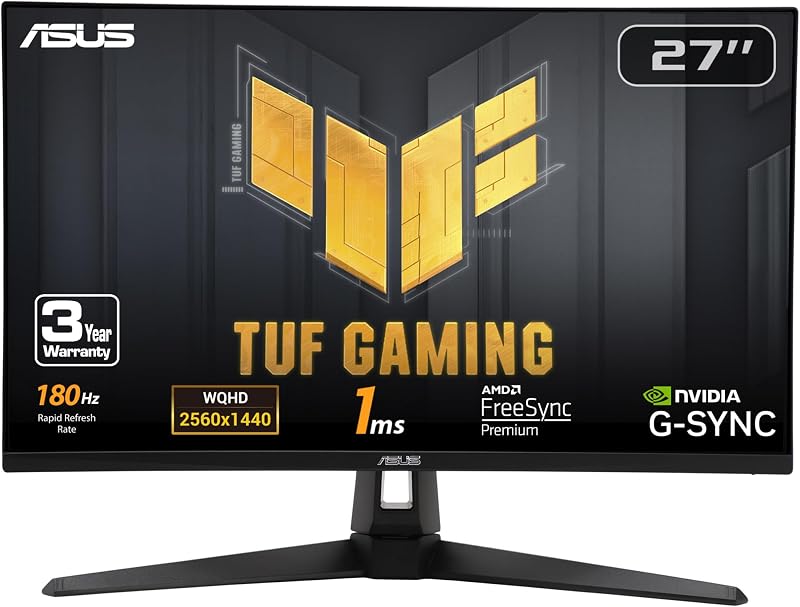
Best for: Everyday gamers wanting balanced 1440p visuals
Pros
- Crisp 1440p QHD resolution
- Smooth 180Hz refresh rate
- ELMB Sync blur reduction
- Built-in stereo speakers
Cons
- Lower refresh rate than 1080p rivals
The ASUS TUF Gaming VG27AQ3A 27 Inch provides a balanced middle ground between high resolution and rapid frame rates. Built around a 27-inch Fast IPS panel running at 2560 x 1440 QHD resolution, this monitor displays noticeably sharper textures and more workspace than standard 1080p options. It operates at a smooth 180Hz refresh rate backed by a 1ms response time and wide 178-degree viewing angles. Color performance is backed by a 130% sRGB color gamut and HDR-10 format support, bringing vivid saturation and clear contrast to campaign maps and daily PC usage.
ASUS incorporates Extreme Low Motion Blur Sync (ELMB Sync) on this display, enabling backlight strobing to operate simultaneously with variable refresh rate technologies like AMD FreeSync Premium and NVIDIA G-SYNC compatibility. The monitor includes built-in speakers for simple audio output without needing desktop speakers. The package includes a DisplayPort cable, power adapter, power cord, L-shaped screwdriver, and a 3-month Adobe Creative Cloud subscription. The ASUS TUF Gaming VG27AQ3A suits gamers wanting crisp 1440p gameplay, though competitive players who demand refresh rates above 240Hz will find faster options further down the list.
Listing details (6 fields)
| Color | BLACK |
|---|---|
| Size | 14.4" x 24.2" x 2.1" |
| Dimensions | 24.2 x 8.4 x 17.9 inches |
| Weight | 10.141264052 Pounds |
| Product Group | Personal Computer |
| Binding | Personal Computers |
Copied from the Amazon product page, not measured here.
2 ASUS TUF VG279QM5A 27 Inch 1080p for Fast Action Esports
 8.2/10
ASUS TUF VG279QM5A 27 Inch 1080p
Best for: Competitive players wanting 240Hz on 27 inches
Pros
- Blazing 240Hz refresh rate
- Ultra-fast 0.3ms minimum response
- DisplayWidget Center mouse control
Cons
- Lower pixel density at 27 inches
For players focused on pure frame delivery and rapid target acquisition, the ASUS TUF VG279QM5A 27 Inch 1080p shifts the focus directly toward raw speed. Instead of higher pixel density, this display features a Full HD 1920 x 1080 resolution on a 27-inch Fast IPS panel running at 240Hz. ASUS rates the response time down to a minimum of 0.3ms, cutting down ghosting during swift perspective turns. It provides 300 cd/m² brightness, a 1000:1 contrast ratio, 99% color gamut coverage, and a matte screen finish to control ambient room reflections.
Software control is made effortless through the DisplayWidget Center, which lets you adjust monitor settings using a mouse instead of physical buttons, alongside TUF Gaming A.I. features to enhance visual clarity. Tear-free gaming is handled through AMD FreeSync Premium, G-SYNC compatibility, VESA AdaptiveSync 240Hz, and ELMB Sync. ASUS bundles a DisplayPort cable, L-shaped screwdriver, and a 3-month Adobe Creative Cloud subscription in the box. The ASUS TUF VG279QM5A fits esports enthusiasts who want a spacious 27-inch screen at 240Hz, though gamers sitting very close to their screen may prefer a smaller footprint or 1440p clarity.
Listing details (5 fields)
| Color | BLACK |
|---|---|
| Dimensions | 7.6 x 24.21 x 17.83 Inches |
| Weight | 9.92 Pounds |
| Product Group | Personal Computer |
| Binding | Personal Computers |
Copied from the Amazon product page, not measured here.
3 ASUS ROG PG27AQWP-W 27 Inch 1440p for Elite OLED Performance
 8.6/10
ASUS ROG PG27AQWP-W 27 Inch 1440p
Best for: Esports purists demanding cutting-edge OLED speed
Pros
- Dual-mode 540Hz and 720Hz
- Inky 1500000:1 Tandem OLED contrast
- DisplayPort 2.1 UHBR20 support
- Instantaneous 0.02ms response
Cons
- Requires active OLED maintenance
The ASUS ROG PG27AQWP-W 27 Inch 1440p stands at the top of the brand’s performance hierarchy, featuring a 26.5-inch Tandem OLED (WOLED) panel designed for uncompromising competitive play. This monitor boasts an ultra-low 0.02ms gray-to-gray response time and a versatile dual-mode function: native QHD resolution at 540Hz, or Full HD resolution pushed to a staggering 720Hz. Its Tandem OLED technology provides 15% higher peak brightness reaching up to 1,500 cd/m², 25% larger color volume, and a 60% longer panel lifespan compared to earlier WOLED screens, protected by a TrueBlack Glossy finish that eliminates haze.
Visual fidelity is verified by VESA DisplayHDR 500 True Black compliance, true 10-bit color depth, 99.5% DCI-P3 coverage, and factory-calibrated Delta E under 2. Connectivity includes high-bandwidth DisplayPort 2.1 UHBR20 running at 80Gbps alongside HDMI 2.1. Panel protection is handled by OLED Care Pro with a Neo Proximity Sensor that dims the screen when you step away to minimize burn-in risks. The package includes a DisplayPort 2.1 cable, HDMI Ultra High-Speed cable, USB 3.2 cable, microfiber cloth, ROG pouch, ROG sticker, and VESA mount kit. The ASUS ROG PG27AQWP-W is the premier pick for enthusiasts wanting the best asus gaming screen available, leaving TUF models for those seeking simpler everyday utility.
Listing details (6 fields)
| Color | Silver |
|---|---|
| Size | 14.5" x 23.8" x 2.5" |
| Dimensions | 10.8 x 23.8 x 21.6 inches |
| Weight | 15.52 Pounds |
| Product Group | Personal Computer |
| Binding | Personal Computers |
Copied from the Amazon product page, not measured here.
4 ASUS TUF Gaming VG259QMR5A 25 Inch for Competitive Frame Rates
 8.6/10
Tournament players who prefer a traditional compact form factor will find a dedicated match in the ASUS TUF Gaming VG259QMR5A 25 Inch. With a 24.5-inch Fast IPS panel, this display keeps all on-screen information inside your central field of vision, avoiding head movement during fast-paced matches. The screen pairs Full HD 1920 x 1080 resolution with an overclocked refresh rate of 310Hz and a 0.3ms minimum response time, allowing competitive shooters to track player movement with absolute fluidity.
ASUS includes ELMB Sync to run blur reduction alongside AMD FreeSync Premium and NVIDIA G-SYNC compatibility for tear-free gameplay. The display features a matte anti-glare finish, 300 cd/m² brightness, a 1000:1 contrast ratio, and 99% color gamut coverage. Users can configure settings with their mouse via DisplayWidget Center and use onboard TUF Gaming A.I. tools. The box contains a DisplayPort cable, L-shaped screwdriver, power cord, and a 3-month Adobe Creative Cloud subscription. The ASUS TUF Gaming VG259QMR5A is tailored for serious esports competitors, though players wanting panoramic immersion may find its 24.5-inch flat panel less encompassing than curved alternatives.
Listing details (5 fields)
| Color | BLACK |
|---|---|
| Dimensions | 6.9 x 22 x 16.8 Inches |
| Weight | 7.5 Pounds |
| Product Group | Personal Computer |
| Binding | Personal Computers |
Copied from the Amazon product page, not measured here.
5 ASUS TUF Gaming VG32VQM5AZ 32 Inch for Expansive Curved Immersion
 9.2/10
Gamers seeking broad peripheral immersion will be drawn to the ASUS TUF Gaming VG32VQM5AZ 32 Inch. This 31.5-inch monitor features a 1500R curvature that matches the natural arc of the human eye, pulling players into driving titles, flight simulators, and expansive campaign maps. Despite its scale, it delivers rapid motion handling via an overclocked 240Hz refresh rate and a 0.5ms minimum response time to minimize motion blur during fast perspective pans.
The screen provides Full HD 1920 x 1080 resolution, a contrast ratio of 100,000,000:1, 1027.8 lm brightness, and 120% sRGB color gamut coverage. Tearing is controlled using AMD FreeSync Premium, VESA AdaptiveSync Display 240Hz, and ELMB Sync technology. You can adjust presets easily through DisplayWidget Center on your desktop. The monitor comes with a DisplayPort cable, L-shaped screwdriver, power cord, a 3-month Adobe Creative Cloud subscription, and a 3-year warranty with advanced replacement. The ASUS TUF Gaming VG32VQM5AZ suits players who prioritize large curved viewing, though those with smaller desks may prefer a more compact screen.
Listing details (6 fields)
| Color | BLACK |
|---|---|
| Size | 16.8" x 28" x 3.4" |
| Dimensions | 8.4 x 27.89 x 19.9 inches |
| Weight | 14.9 pounds |
| Product Group | Personal Computer |
| Binding | Personal Computers |
Copied from the Amazon product page, not measured here.
6 ASUS TUF Gaming 24” for Compact Desk Spaces
 9.6/10
Top score 9.6/10, scored 9.4/10 or higher
ASUS
Our score: 9.6/10 Overwhelmingly positive
The ASUS TUF Gaming 24” (model VG249QE5A with a 23.8-inch viewable area) offers responsive performance in a space-saving chassis. This Full HD 1920 x 1080 IPS monitor overclocks from 144Hz to 146Hz, providing fluid animations and quick responsiveness for everyday gaming. It combines a 1ms response time with a matte finish to prevent harsh reflections in well-lit rooms. Shoppers looking for a reliable monitor asus 24 option will appreciate its dependable feature set.
Color reproduction reaches 125% of the sRGB color space, enhanced by ASUS Shadow Boost technology to reveal enemies hidden in dark areas without overexposing highlights. Motion clarity is preserved by ELMB Sync, while integrated stereo speakers provide straightforward audio playback. The monitor also supports Variable Overdrive and connects with DisplayWidget Center for quick profile changes. Inside the package, ASUS provides an HDMI cable, power cord, and a 3-year warranty. The ASUS TUF Gaming VG249QE5A is an ideal entry-level pick for smaller gaming desks, stepping aside only when users need higher refresh rates above 200Hz or sharper 1440p resolution.
Listing details (5 fields)
| Color | BLACK |
|---|---|
| Dimensions | 6.9 x 21.3 x 15.5 inches |
| Weight | 7.3 pounds |
| Product Group | Personal Computer |
| Binding | Personal Computers |
Copied from the Amazon product page, not measured here.
How to Choose the Right ASUS Gaming Screen
Deciding which asus gaming monitor to buy comes down to matching your system hardware, desk size, and preferred game genres. When doing an asus gaming monitor comparison, resolution is the most critical starting point. Full HD 1080p monitors like the 310Hz VG259QMR5A or 240Hz VG279QM5A put less load on your graphics card, making it easier to hit peak frame rates. Moving up to 2560 x 1440 QHD on the VG27AQ3A or the ROG PG27AQWP-W yields sharper textures and finer details, which benefits visual clarity in open-world titles.
Physical size and panel shape also impact your gaming experience. A compact 24-inch or 24.5-inch panel keeps the entire screen inside your line of sight, which is preferred by competitive first-person shooter players. A 27-inch display provides a versatile middle ground for both gaming and general productivity. If you want maximum immersion for simulators and adventure games, a 31.5-inch curved display like the VG32VQM5AZ wraps visuals around your peripheral vision. Keep viewing distance in mind, as larger 1080p monitors show individual pixels more clearly when viewed from close range.
Panel technology separates standard gaming screens from premium displays. Fast IPS panels, used on most TUF models, offer wide viewing angles, reliable color accuracy, and low pixel response times that prevent smearing. For top-tier visual depth and instantaneous response times, the Tandem OLED panel on the ROG PG27AQWP-W delivers true blacks and an unmatched 0.02ms response time. Shoppers who want to survey the wider ecosystem of asus gaming monitors can balance these panel attributes against their specific desk requirements.
Finally, check for ASUS-specific features and included box contents. Proprietary ELMB Sync allows backlight strobing and variable refresh rates to function together, eliminating motion blur without introducing screen tearing. DisplayWidget Center support makes adjusting brightness and display modes convenient by letting you use your mouse. Checking the included accessories, such as DisplayPort or HDMI cables, ensures you have the right connection to reach your monitor’s maximum advertised refresh rate straight out of the box.
FAQ
What is the benefit of ASUS ELMB Sync over standard motion blur reduction?
Standard backlight strobing features typically force monitors to run at a fixed refresh rate and will not work when variable refresh rate technologies like FreeSync or G-SYNC are active. ASUS ELMB Sync allows motion blur reduction to operate alongside variable refresh rates at the same time. This ensures fast-moving game visuals stay crisp and clear without introducing screen tearing or stutter when frame rates fluctuate.
Is 1080p resolution sharp enough on a 27-inch or 32-inch ASUS monitor?
A Full HD 1080p resolution on a 27-inch or 31.5-inch screen delivers smooth performance for fast-paced competitive gameplay where high frame rates take priority over pixel count. However, the larger screen size means individual pixels are spaced further apart, which makes fine desktop text and small UI elements appear less sharp than on a 1440p monitor. Gamers who sit close to their desk generally prefer 1440p for screens 27 inches and larger.
How does OLED Care Pro protect the ROG PG27AQWP-W?
ASUS OLED Care Pro is a set of hardware and software safeguards designed to maintain panel health and lower the risk of burn-in on OLED displays. On the ROG PG27AQWP-W, this system includes a Neo Proximity Sensor that detects when the user steps away from their desk and automatically switches the screen to black. This prevents static images from lingering on the panel, helping extend the overall lifespan of the Tandem OLED display.
Can I adjust ASUS monitor settings without using the physical buttons?
Yes, many ASUS gaming displays support the ASUS DisplayWidget Center software utility. Once installed on your computer, this application lets you customize screen brightness, color profiles, and gaming features directly with your mouse. This eliminates the need to reach around the monitor bezel to navigate the built-in joystick or button menus.
Do ASUS TUF monitors come with the required video cables?
Yes, ASUS includes video cables with its gaming screens so you can set them up immediately. Models like the VG27AQ3A, VG279QM5A, VG259QMR5A, and VG32VQM5AZ come packed with a DisplayPort cable, while the compact VG249QE5A includes an HDMI cable. The premium ROG PG27AQWP-W provides both DisplayPort 2.1 and HDMI Ultra High-Speed cables in the box.


